Every time I look at a campaign report, there are two numbers for clicks: the count from my redirect service's database and the session count from GA4. They never match. Early on I assumed one was broken. After running vvd.im in production for long enough, I've accepted that they're measuring different things, they're both correct for what they actually measure, and conflating them is how bad decisions get made.
This article is about the mechanics of why those numbers diverge, how large the gaps typically are, and — most practically — which source to reach for depending on the specific question you're trying to answer.
What Each System Actually Captures
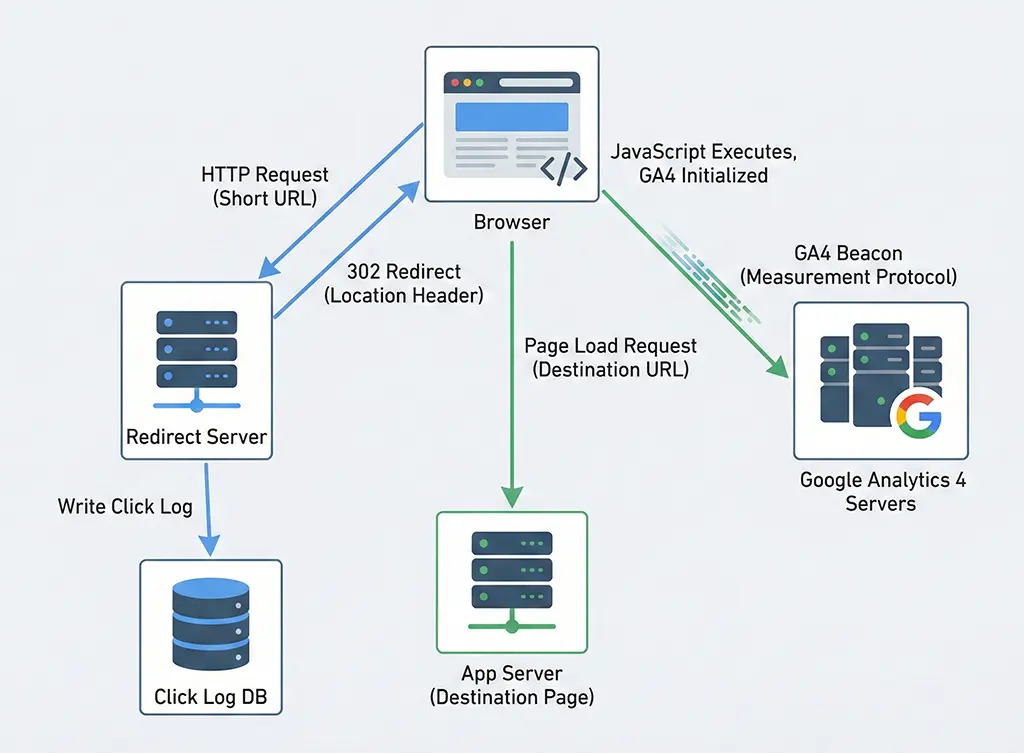
Server-side click logging happens at the HTTP layer, before the browser ever renders a page. When a shortened link is hit, the redirect service receives the request, persists a click record, and then responds with a redirect. That log entry exists regardless of what happens next — whether the destination page loads, whether JavaScript runs, whether the user has an ad blocker, whether they close the tab in 200ms.
The server log is a record of an HTTP transaction. It captured an intent to navigate. Nothing more.
Client-side analytics — GA4 in this context — captures something fundamentally different: a page_view event fired by JavaScript running in the user's browser, after the destination page has loaded far enough to execute the tracking snippet. The GA4 gtag.js call needs the page to load, the script to not be blocked, the network request to reach Google's collection endpoint, and the session to be associable to a user.
That's four additional requirements beyond "the click happened." Each one is a potential point of divergence.
The Redirect Service's Log: Spring Boot Implementation
In vvd.im, a click record is written synchronously before the redirect response is sent. Here's a simplified version of the handler:
// ClickRedirectController.java
@GetMapping("/{shortCode}")
public ResponseEntity<Void> redirect(
        @PathVariable String shortCode,
        HttpServletRequest request) {

    String destination = linkService.resolveDestination(shortCode);
    if (destination == null) {
        return ResponseEntity.notFound().build();
    }

    // Log before redirecting — this is intentional.
    // If we log after, a client timeout means we lose the record.
    clickLogService.recordAsync(shortCode, request);

    return ResponseEntity
            .status(HttpStatus.FOUND)
            .location(URI.create(destination))
            .build();
}
// ClickLogService.java
@Async("clickLogExecutor")
public void recordAsync(String shortCode, HttpServletRequest request) {
    ClickLog log = ClickLog.builder()
            .shortCode(shortCode)
            .userAgent(request.getHeader("User-Agent"))
            .referer(request.getHeader("Referer"))
            .ipHash(hashIp(request.getRemoteAddr())) // SHA-256, not raw IP
            .clickedAt(Instant.now())
            .build();

    // Write to MariaDB via JPA, with Redis cache for dedup window
    clickLogRepository.save(log);
}
The @Async here is a deliberate trade-off. The log write happens off the request thread, which keeps redirect latency low, but it introduces a small window where the click is logged and the redirect fires but the async task hasn't committed yet. Under normal load this is irrelevant. Under a database failover or application restart mid-campaign, you can lose a few records. That's acceptable data loss for the performance gain — but it's worth knowing about.
The critical design decision: the log is written before the redirect response. Some implementations do the reverse — redirect first, log second — which means any error in the logging code silently swallows click data. Don't do that.
The Five Gaps That Explain the Divergence
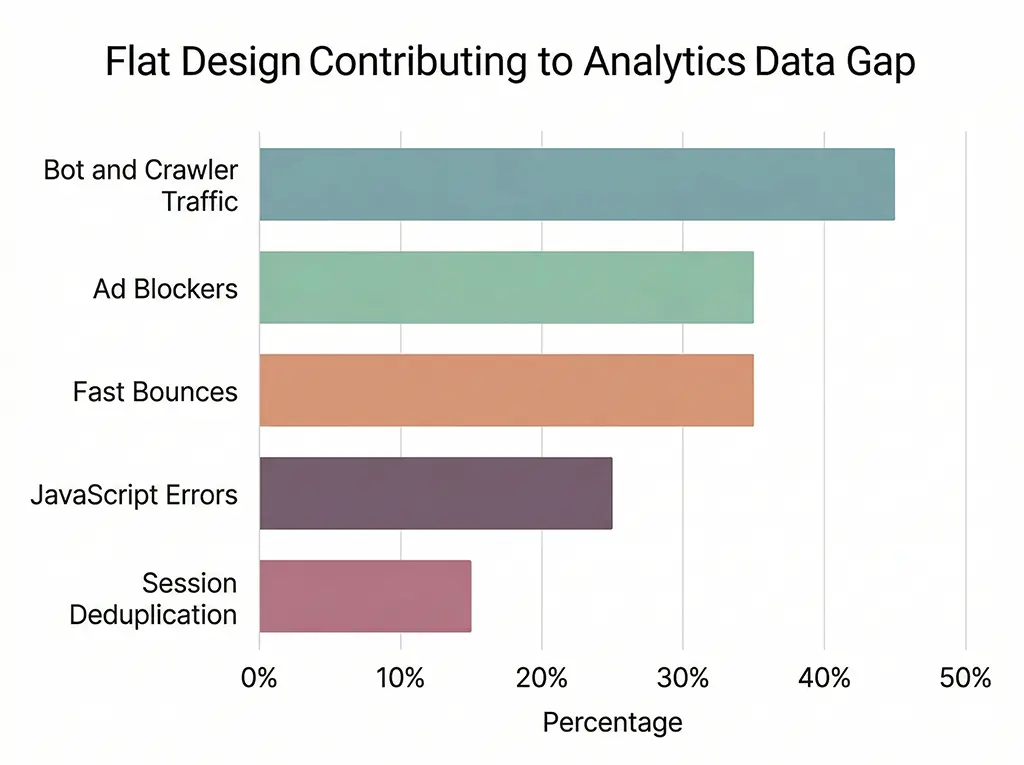
In production I consistently see GA4 session counts running 15–35% below server-side click counts for the same short links. The variance depends on traffic source and device type. Here's where that gap comes from:
1. Bot and Crawler Traffic
Search engine crawlers, link preview fetchers (Slack, iMessage, WhatsApp, Twitter/X), uptime monitors, and security scanners all hit your redirect endpoint. They log as clicks on the server. They don't execute JavaScript, so they don't fire GA4 events.
For a link shared in a Slack channel with 200 members, the Slack link unfurler hits your redirect endpoint once to generate the preview. That's a server-side click with a User-Agent containing Slackbot. Zero GA4 sessions.
Filtering bots from server logs is not fully solved. User-Agent strings are trivially spoofed. My current approach uses a known-bot list combined with behavioral signals (no Referer header on direct-type traffic, sub-50ms subsequent requests from the same IP). It's good enough to be directionally correct, not good enough to be authoritative.
2. Ad Blockers and Privacy Extensions
uBlock Origin, Privacy Badger, and Brave's built-in shields all block the GA4 beacon (google-analytics.com/g/collect). The page loads. The user sees your content. Your server logged the click. GA4 sees nothing.
Among technical audiences — developers reading documentation, security professionals, privacy-aware consumers — ad blocker penetration runs 40–60%. If your short links drive traffic to developer tools or security products, expect a larger-than-average GA4 undercount.
3. Early Exits and Fast Bounces
A click fires the redirect. The destination page starts loading. The user hits the back button at 800ms. If gtag.js hasn't executed yet, no GA4 event. The server logged it. Google didn't.
This is more common than it seems on mobile connections in emerging markets or on large, slow-loading landing pages. Page load time directly affects GA4 data completeness.
4. JavaScript Errors on the Destination Page
If anything throws before gtag('config', ...) executes, the tracking call never fires. This is a destination-side problem you may have no control over, especially when driving traffic to third-party pages.
5. Same-Session Deduplication
GA4 merges rapid sequential page views into a single session. If a user clicks your short link, bounces back, and clicks again within the same session window, that's two server-side clicks but potentially one GA4 session. This is a counting methodology difference, not a data loss issue, but it contributes to the numerical gap.
A Practical Query to Measure Your Own Gap
Before deciding which source to trust, measure your actual divergence ratio per campaign. You need server-side click counts joined against GA4 session counts by UTM campaign. The GA4 side requires pulling data via the GA4 Data API or BigQuery export; the server side comes from your own database.
Here's the MariaDB query I use to get the server-side baseline, grouping by the UTM campaign extracted from the destination URL:
-- Get click counts per UTM campaign from server-side logs
-- Assumes destination URL is stored in click_logs.destination_url
SELECT
    REGEXP_SUBSTR(destination_url, 'utm_campaign=([^&]+)') AS utm_campaign,
    COUNT(*)                                                AS server_clicks,
    COUNT(DISTINCT ip_hash)                                 AS unique_ips,
    SUM(CASE
        WHEN user_agent REGEXP 'bot|crawler|spider|slackbot|facebookexternalhit|twitterbot'
        THEN 1 ELSE 0
    END)                                                    AS known_bot_clicks,
    DATE(clicked_at)                                        AS click_date
FROM click_logs
WHERE clicked_at >= CURRENT_DATE - INTERVAL 30 DAY
  AND destination_url LIKE '%utm_campaign=%'
GROUP BY utm_campaign, click_date
ORDER BY click_date DESC, server_clicks DESC;
Compare the server_clicks - known_bot_clicks figure against your GA4 session count for the same campaign and date range. The ratio that falls out is your baseline divergence for that traffic source. I've seen this range from 1.1x (paid search with mostly desktop Chrome users) to 3.2x (viral social shares with high mobile and bot activity).
Once you know your ratio, you can apply it as a rough correction factor — but don't overfit. The ratio shifts with traffic composition. Recalculate it monthly.
Decision Framework: Which Source to Use for Which Question
This is the part that actually matters operationally. The answer isn't "server logs are more accurate" or "GA4 is more accurate." It's that they answer different questions.
Use server-side logs when:
You need total reach. Every device, every user agent, every bot that fetched the link. If you're reporting to a client on how many times a link was accessed — as in, how many times the short URL was resolved — server logs are the answer. GA4 undercounts this by design.
You need sub-second timing data. GA4 data arrives in collection reports with latency. Server logs are real-time. If you're rate-limiting, fraud-detecting, or making real-time routing decisions based on click volume, server logs are the only option.
You're investigating technical issues. A 301 caching problem, a redirect loop, a missing destination URL — these show up in server logs immediately, with full request headers. GA4 is useless here.
You're auditing data completeness. The gap between server logs and GA4 is your data loss signal. If it widens suddenly, something changed — a new ad blocker policy, a JavaScript error deployment, a bot campaign targeting your links. Server logs are the canary.
Use GA4 when:
You're measuring human behavior. Session duration, scroll depth, conversion events, goal completions — these only exist in GA4. A bot click tells you nothing about whether humans found the page valuable.
You need cross-device user stitching. GA4's User-ID and Google Signals features attempt to connect touchpoints across devices for the same user. Server logs see IP addresses and user agents; they can't reliably identify a user across a phone and a laptop.
You're doing attribution analysis. Which channel drove the conversion? GA4's attribution models — even the flawed ones — operate on session and event data, not raw click counts. The acquisition reports, conversion paths, and assisted conversion data are all GA4-native.
You're reporting on campaign quality, not campaign volume. A campaign with 10,000 server-side clicks and a 0.3% conversion rate is performing worse than one with 3,000 clicks and a 4.1% conversion rate. That comparison is only visible in GA4.
Use both together when:
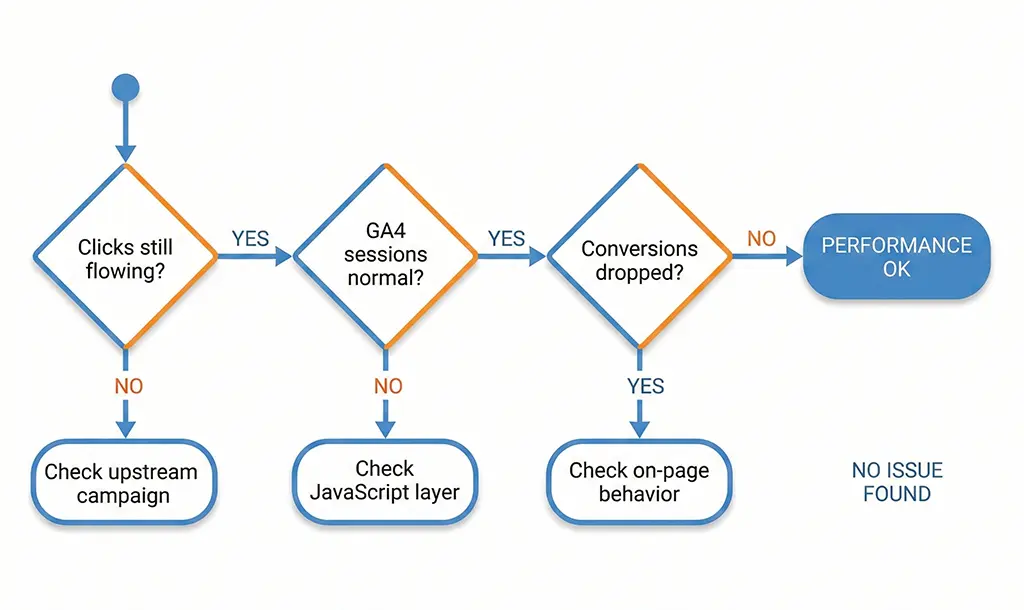
You're debugging a sudden drop in conversion rates. The sequence: check server logs first to confirm clicks are still flowing at expected volume. If clicks dropped, the problem is upstream (campaign paused, link broken). If clicks are normal but GA4 sessions dropped, the problem is at the JavaScript layer (script error, blocked tag, page load regression). If sessions are normal but conversions dropped, the problem is on-page or in your conversion event configuration.
This three-step diagnostic saves a lot of wasted time chasing the wrong layer.
Reducing the Gap: What's Actually Worth Doing
You can't eliminate the divergence, but you can narrow it for traffic where it matters.
Server-side tagging via GTM Server-Side or Measurement Protocol. Instead of relying on browser JavaScript to fire GA4 events, your redirect service fires them directly to GA4's Measurement Protocol endpoint at the moment of the click. This bypasses ad blockers entirely and catches fast bounces. The trade-off: you lose browser-side behavioral signals (scroll, engagement time), and you need to pass along session identifiers correctly to avoid double-counting with any remaining client-side tags.
Here's the minimum viable Measurement Protocol call from Spring Boot:
// GA4MeasurementProtocolService.java
// Fires a GA4 page_view event server-side at redirect time
// Requires: GA4 Measurement ID, API Secret (from GA4 Admin > Data Streams)
@Service
public class GA4MeasurementProtocolService {

    private static final String MP_ENDPOINT =
        "https://www.google-analytics.com/mp/collect";

    @Value("${ga4.measurement-id}")
    private String measurementId;

    @Value("${ga4.api-secret}")
    private String apiSecret;

    private final RestTemplate restTemplate = new RestTemplate();

    public void sendClickEvent(String clientId, String shortCode,
                               String destinationUrl, String utmParams) {
        String url = MP_ENDPOINT + "?measurement_id=" + measurementId
                   + "&api_secret=" + apiSecret;

        Map<String, Object> payload = Map.of(
            "client_id", clientId,         // Must be stable per user; derive from cookie or generate
            "events", List.of(Map.of(
                "name", "short_link_click",
                "params", Map.of(
                    "short_code", shortCode,
                    "destination_url", destinationUrl,
                    "utm_params", utmParams,
                    "engagement_time_msec", "1"  // Required for session attribution
                )
            ))
        );

        try {
            restTemplate.postForEntity(url, payload, String.class);
        } catch (Exception e) {
            // Log but don't fail the redirect
            log.warn("GA4 MP call failed for {}: {}", shortCode, e.getMessage());
        }
    }
}
The client_id field is the hardest part. GA4 uses it to stitch events into sessions and users. If you generate a new UUID for every server-side call, you get accurate event counts but completely broken session and user data. You need to read the _ga cookie value from the incoming request headers, which is only present if the user has visited a GA4-tracked property before from the same browser. For cold traffic, you're still generating a new ID — but for returning users, session continuity is preserved.
Bot filtering on the server side. Invest in a proper bot-filter middleware layer. It won't achieve 100% accuracy, but filtering obvious crawlers before writing to your click log reduces noise without losing real data. The key is to filter at write time, not at query time — your database doesn't need to store Googlebot records.
// BotFilterInterceptor.java (Spring Boot HandlerInterceptor)
@Component
public class BotFilterInterceptor implements HandlerInterceptor {

    // Compiled once at startup for performance
    private static final Pattern BOT_UA_PATTERN = Pattern.compile(
        "(?i)(bot|crawler|spider|slackbot|facebookexternalhit|" +
        "twitterbot|whatsapp|linkedinbot|telegrambot|discordbot|" +
        "googlebot|bingbot|yandexbot|duckduckbot|ia_archiver)",
        Pattern.CASE_INSENSITIVE
    );

    @Override
    public boolean preHandle(HttpServletRequest request,
                             HttpServletResponse response,
                             Object handler) {
        String ua = request.getHeader("User-Agent");
        boolean isBot = (ua == null) || BOT_UA_PATTERN.matcher(ua).find();
        request.setAttribute("is_bot", isBot);
        // Don't block — still redirect — but tag the request
        return true;
    }
}
Note that this tags rather than blocks. Link preview fetchers — Slack, iMessage — perform a real function (generating the preview the user sees before clicking). Blocking them breaks previews. Tag them in the log, filter them at query time, but always serve the redirect.
The Number You Should Actually Report
If someone asks "how many clicks did that campaign get," the honest answer is: it depends what you want to know.
For billing a client or justifying ad spend, use server-side clicks minus known bots. That's the most complete picture of link access and is resistant to ad blockers and JavaScript failures.
For evaluating campaign quality and optimizing creative or targeting, use GA4 sessions. Imperfect, undercounted, but behaviorally meaningful.
For conversion reporting, use GA4 exclusively. The attribution models, the funnel analysis, the assisted conversion paths — none of that exists in server logs.
The mistake is using one number for all three questions. I've seen teams argue about "click discrepancy" for hours when the real answer is that their two data sources were measuring two completely different things — and both were correct.