Email tracking is a different problem from web tracking. On the web, you control the environment — the page, the JavaScript, the tag manager. In email, you control none of it. The message leaves your server and enters an ecosystem you cannot inspect: dozens of email clients, corporate security gateways, spam filters, link-rewriting proxies, and privacy features that have been systematically dismantling tracking signals since 2021.
What follows is a breakdown of the specific mechanisms that interfere with email link tracking, what signal each one destroys, and what you can realistically salvage. I'm writing this from the perspective of running a redirect service that processes email campaign traffic — meaning I see what actually hits the server, not what the ESP dashboard reports.
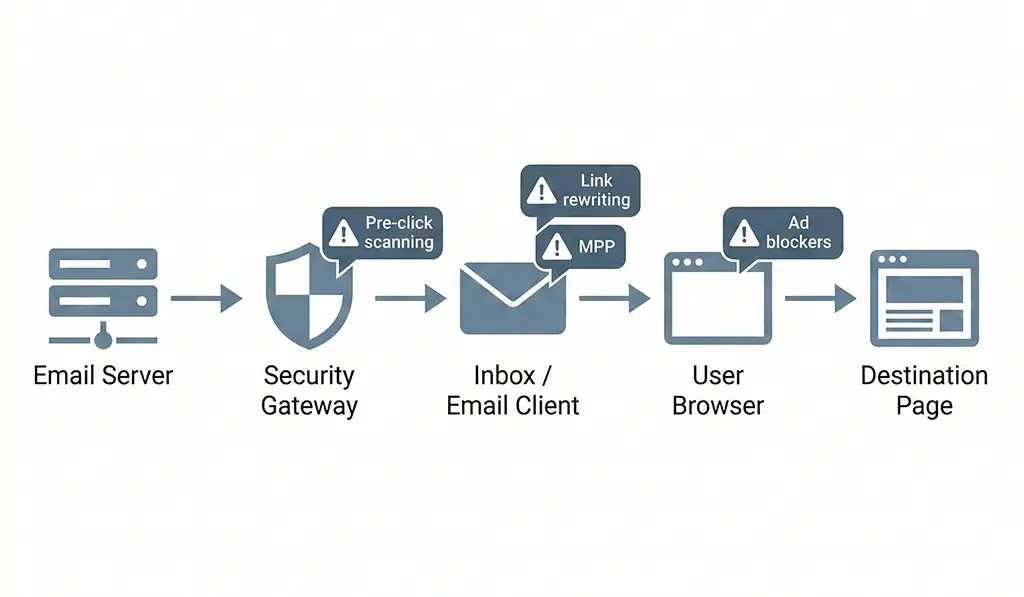
Security Scanners: The Phantom Clicks You're Already Getting
Corporate email security products — Proofpoint, Mimecast, Microsoft Defender for Office 365, Barracuda — scan every link in every inbound message. They do this by fetching the URL before the recipient ever sees the message, often rewriting it through their own redirect proxy in the process. The goal is to detect malware, phishing destinations, and credential-harvesting pages.
The side effect for you: your redirect service receives a click with a legitimate-looking User-Agent string, no Referer header, and an IP address belonging to a security vendor's scanning infrastructure. Your server logs it as a click. The human hasn't moved yet.
This happens at delivery time, not at open time. Which means your server-side click count starts accumulating the moment the message hits corporate inboxes — before your open pixel has even fired. I've seen campaigns where click counts exceeded open counts by 15–20% due to scanner traffic, which is statistically impossible if those clicks were human.
Identifying scanner traffic in your logs
The behavioral signature is distinct once you know what to look for. Scanners typically:
- Hit the link within seconds of message delivery, not after a human read delay
- Come from IP ranges belonging to security vendors (Proofpoint's ranges are well-documented; Mimecast less so)
- Use generic or headless browser User-Agents
- Do not follow the redirect — they fetch the short URL itself but often stop at the first redirect hop
- Arrive in clusters: the same short code hit 3–5 times in rapid succession from different IPs in the same ASN
Here's a MariaDB query to surface suspicious click clusters from your logs, grouped by short code and time window:
-- Identify potential scanner click clusters
-- Flags short codes hit 3+ times within 10 seconds from IPs in the same /24 subnet
SELECT
    short_code,
    -- Extract /24 subnet from hashed IP is not possible; use raw IP before hashing in a staging column
    DATE_FORMAT(clicked_at, '%Y-%m-%d %H:%i:%s') AS click_window_start,
    COUNT(*)                                       AS click_count,
    GROUP_CONCAT(DISTINCT user_agent ORDER BY user_agent SEPARATOR ' | ')
                                                   AS user_agents,
    MIN(clicked_at)                                AS first_click,
    MAX(clicked_at)                                AS last_click,
    TIMESTAMPDIFF(SECOND, MIN(clicked_at), MAX(clicked_at))
                                                   AS window_seconds
FROM click_logs
WHERE clicked_at >= NOW() - INTERVAL 7 DAY
  AND referer IS NULL  -- Scanners typically send no Referer
GROUP BY
    short_code,
    -- Group into 10-second buckets
    FLOOR(UNIX_TIMESTAMP(clicked_at) / 10)
HAVING
    click_count >= 3
    AND window_seconds <= 10
ORDER BY click_window_start DESC;
The referer IS NULL filter is the strongest signal. Legitimate human clicks from email clients nearly always send a Referer of either the email client's web interface domain or nothing-but-with-a-distinctive-UA. Security scanners almost universally omit it.
One important caveat: Microsoft's SafeLinks rewrites your URLs through their own proxy (safelinks.protection.outlook.com). When a human clicks a SafeLinks-wrapped URL, the Referer seen by your redirect service is Microsoft's proxy domain, not the original email context. This means email click attribution in your server logs degrades for Office 365 users — you know it was an email click, but you lose the campaign and message context unless it's encoded in the UTM parameters that survive the rewrite.
Apple Mail Privacy Protection: What It Actually Does to Your Data
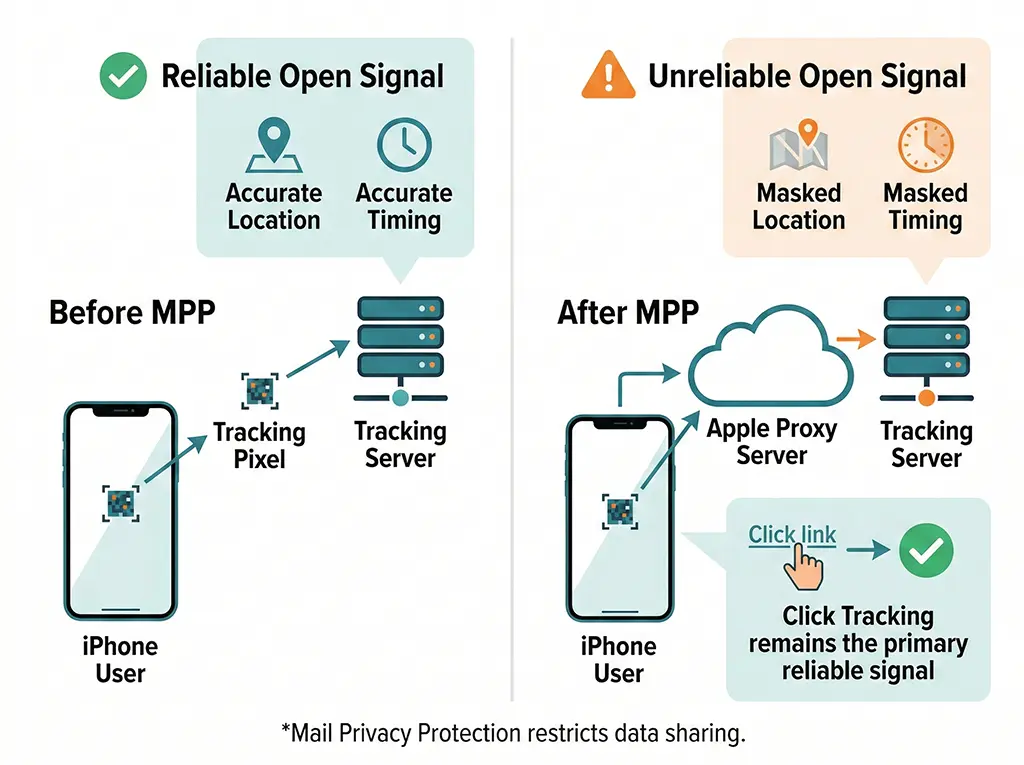
Apple's Mail Privacy Protection (MPP), introduced in iOS 15 and macOS Monterey in late 2021, is the most impactful privacy feature for email marketers since GDPR. Most articles about it focus on open tracking. The click tracking implications are less discussed but equally significant.
MPP works by routing all remote content — images, including tracking pixels — through Apple's privacy proxy infrastructure. This fires the open pixel from an Apple IP address, not the user's. The user's actual location, device type, and timing are masked.
For click tracking specifically, MPP does not pre-click your links the way security scanners do. A human still has to tap or click. But what it does do is strip referrer information and route the click through Apple's proxy for users who have Apple Intelligence features enabled, which increasingly means link-click context arrives at your server without the email client fingerprint you'd use to categorize it as email traffic.
The more acute problem is open rate inflation. If you're using open rate as a proxy for list engagement to suppress cold subscribers or to time send optimization, MPP has made that signal unreliable for a substantial fraction of your list. Apple Mail's market share on mobile is consistently above 50% in B2C email in the US and Europe. For those subscribers, you no longer know if they opened. Which means click-through rate — real human clicks on links — has become the primary engagement signal that still holds.
This raises the stakes for accurate click tracking considerably. If clicks are now the best engagement signal you have, phantom clicks from scanners, pre-fetch events, and forwarded-email re-clicks contaminate your most important metric.
UTM Parameters in Email: What Survives Forwarding, Rewriting, and Client Behavior
UTM parameters in email links are more fragile than most campaign managers assume. They survive the initial click in most cases, but there are several scenarios where they degrade or disappear entirely.
Email forwarding
When a recipient forwards your email, the forwarded version contains the original links — including UTMs. If the secondary recipient clicks, your server sees a click with the original campaign UTMs but from a different context. You cannot distinguish a forward-click from a direct-click by the original recipient at the UTM level.
Short URLs help here. A short URL assigned to a specific campaign send can carry an opaque identifier that encodes send context (campaign ID, send batch, list segment) in the short code itself, not in querystring parameters that survive forwarding unchanged and become misleading.
ESP link wrapping
Most ESPs — Mailchimp, Klaviyo, SendGrid, Campaign Monitor — wrap your links in their own tracking redirect before delivery. A link you specify as:
https://vvd.im/abc123?utm_source=email&utm_medium=newsletter&utm_campaign=march-launchGets wrapped to something like:
https://click.mailchimp.com/track/click/123456/vvd.im?p=eyJzIjoi...The original URL is base64-encoded in the wrapper URL's query parameters. When the user clicks, Mailchimp's server decodes it, logs the click against their system, and redirects to your short URL, which then logs its own click and redirects to the final destination. That's two redirect hops before the user reaches your page.
The UTM parameters on your short URL survive this chain intact, because the ESP wrapper redirects to the full original URL including querystring. But what you lose is the Referer header. By the time your redirect service receives the request, the Referer is the ESP's click-tracking domain, not the email client. This is mostly fine — you're attributing via UTMs, not Referer — but it means Referer-based email detection logic breaks entirely for ESP-wrapped links.
Link rewriting by security gateways
The most dangerous scenario for UTM integrity is when a corporate security gateway rewrites your link and introduces encoding errors or truncation. Proofpoint's URL Defense has been known to truncate long URLs at specific character limits in certain configurations, silently dropping trailing querystring parameters. If your UTM string is long and the rewritten URL hits a length limit, utm_content and utm_term parameters — typically at the end — disappear.
Keep your UTM strings short. Use campaign IDs rather than descriptive strings where possible. A parameter like utm_campaign=q1-enterprise-nurture-sequence-3-variant-b is both harder to read in reports and more vulnerable to truncation than utm_campaign=q1-ent-n3b.
Building a Reliable Click Log for Email Traffic in Spring Boot
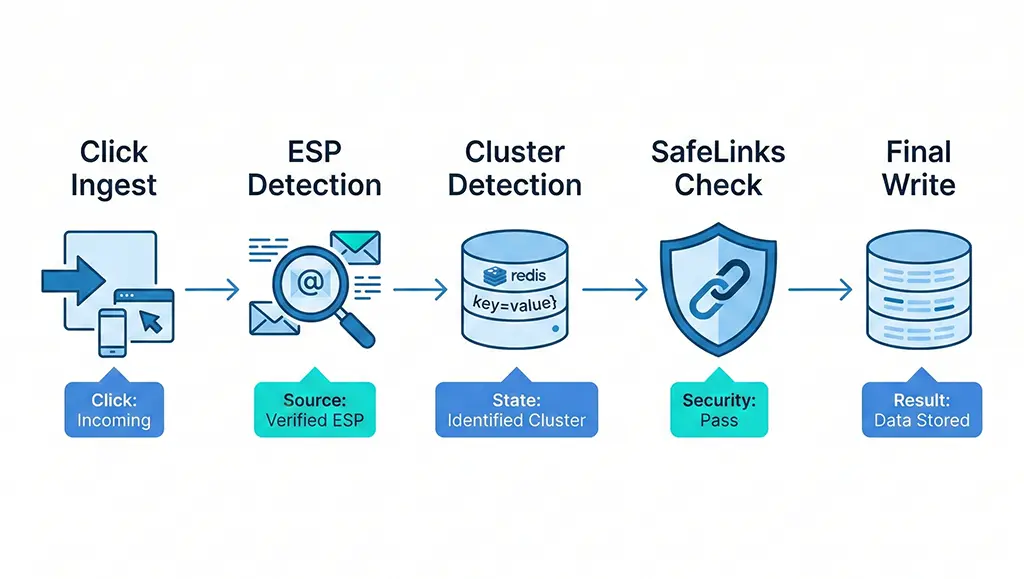
Given the noise sources above, here's how I structure the click log for email campaign traffic in vvd.im to preserve the signals that are still trustworthy while tagging the ones that aren't.
The key principle is to capture everything at write time and filter at query time. Discarding data on ingest because you think it might be a scanner is a decision you can't reverse. Tagging it as suspicious and keeping it gives you the option to revisit the classification logic later.
-- MariaDB schema for email-aware click logging
CREATE TABLE click_logs (
    id             BIGINT UNSIGNED AUTO_INCREMENT PRIMARY KEY,
    short_code     VARCHAR(16)     NOT NULL,
    clicked_at     DATETIME(3)     NOT NULL DEFAULT CURRENT_TIMESTAMP(3),
    ip_hash        CHAR(64)        NOT NULL,  -- SHA-256 of raw IP
    user_agent     TEXT,
    referer        VARCHAR(2048),
    utm_source     VARCHAR(255),
    utm_medium     VARCHAR(255),
    utm_campaign   VARCHAR(255),
    utm_content    VARCHAR(255),
    utm_term       VARCHAR(255),

    -- Email-specific classification columns
    is_suspected_scanner   TINYINT(1) NOT NULL DEFAULT 0,
    is_esp_wrapped         TINYINT(1) NOT NULL DEFAULT 0,
    esp_vendor             VARCHAR(64),       -- 'mailchimp', 'klaviyo', etc.
    safelinks_wrapped      TINYINT(1) NOT NULL DEFAULT 0,

    INDEX idx_short_code_clicked (short_code, clicked_at),
    INDEX idx_campaign (utm_campaign, clicked_at),
    INDEX idx_scanner_flag (is_suspected_scanner, clicked_at)
) ENGINE=InnoDB DEFAULT CHARSET=utf8mb4;
// EmailClickClassifier.java
// Applied at click-log write time to tag email-specific patterns
@Component
public class EmailClickClassifier {

    // Known ESP click-tracking domains for is_esp_wrapped detection
    private static final Set<String> ESP_DOMAINS = Set.of(
        "click.mailchimp.com",
        "click.convertkit-mail.com",
        "links.iterable.com",
        "t.klaviyo.com",
        "u.sendgrid.net",
        "click.sendgrid.net",
        "email.mg",          // Mailgun
        "tracking.campaign-monitor.com"
    );

    private static final String SAFELINKS_DOMAIN = "safelinks.protection.outlook.com";

    public ClickClassification classify(HttpServletRequest request) {
        String referer = request.getHeader("Referer");
        String ua = StringUtils.defaultString(request.getHeader("User-Agent"), "");
        Instant now = Instant.now();

        boolean espWrapped = false;
        String espVendor = null;
        boolean safelinksWrapped = false;
        boolean suspectedScanner = false;

        if (referer != null) {
            // Check for ESP wrapping
            for (String domain : ESP_DOMAINS) {
                if (referer.contains(domain)) {
                    espWrapped = true;
                    espVendor = domain;
                    break;
                }
            }
            // Check for SafeLinks
            if (referer.contains(SAFELINKS_DOMAIN)) {
                safelinksWrapped = true;
            }
        }

        // Scanner heuristics — referer absent + no realistic UA
        if (referer == null && (ua.isBlank() || ua.contains("python-requests")
                || ua.contains("curl") || ua.contains("Go-http-client"))) {
            suspectedScanner = true;
        }

        return new ClickClassification(espWrapped, espVendor,
                                       safelinksWrapped, suspectedScanner);
    }
}
The ESP domain list needs maintenance — vendors update their click-tracking subdomains periodically. I check it quarterly by looking at the referer values in my own click logs and cross-referencing against any ESP domains I don't recognize.
Deduplication window for scanner clicks
One additional layer worth implementing: a Redis-based deduplication window that identifies clicks on the same short code from IPs in the same /24 subnet within a 30-second window. Scanner clusters almost always fall within this window; human forwarded-email re-clicks typically don't, because different people in different locations open at different times.
// ScannerDeduplicationService.java
// Uses Redis INCR + EXPIRE to count rapid same-subnet clicks
@Service
public class ScannerDeduplicationService {

    private static final int WINDOW_SECONDS = 30;
    private static final int CLUSTER_THRESHOLD = 3;

    private final RedisTemplate<String, String> redis;

    public ScannerDeduplicationService(RedisTemplate<String, String> redis) {
        this.redis = redis;
    }

    /**
     * Returns true if this click matches a rapid-cluster pattern.
     * Does not block — caller still logs the click but tags it.
     *
     * @param shortCode  The short code being clicked
     * @param subnetKey  First three octets of the raw IP, e.g. "203.0.113"
     */
    public boolean isSuspectedCluster(String shortCode, String subnetKey) {
        // Key: "scan:{shortCode}:{subnet}", TTL = window
        String key = "scan:" + shortCode + ":" + subnetKey;

        Long count = redis.opsForValue().increment(key);
        if (count != null && count == 1) {
            // First hit — set the expiry
            redis.expire(key, Duration.ofSeconds(WINDOW_SECONDS));
        }
        return count != null && count >= CLUSTER_THRESHOLD;
    }
}
Pass the raw IP to this service before hashing it for storage. You need the raw IP to extract the subnet key, but you should never persist the raw IP itself for GDPR compliance. The subnet key (203.0.113) is coarse enough to not be personally identifiable while still being precise enough to catch scanner clusters.
What You Can Still Trust — and What Reporting to Build Around It
After accounting for scanner traffic, MPP, ESP wrapping, and SafeLinks, here's the honest inventory of what survives email tracking in 2026:
Still reliable: UTM-attributed clicks minus scanner noise. If you filter is_suspected_scanner = 0 and is_esp_wrapped = 1 (i.e., real clicks that came through an ESP wrapper, meaning a human clicked something in an email), you have a reasonably clean count of human email clicks. It undercounts by some fraction due to ad blockers and MPP-related proxy routing, but it's directionally trustworthy for week-over-week comparison within the same list.
Still reliable: click-to-conversion rate, not raw click counts. The denominator (clicks) and numerator (conversions) are both affected by the same tracking degradation, so the ratio is more stable than either absolute count. If scanner clicks inflate your click count by 15% but don't complete your conversion events, your conversion rate is deflated by 15% — but it deflates consistently, which means relative comparisons between campaigns are valid even if the absolute rate is wrong.
No longer reliable: open rate as an engagement proxy. MPP has made this a lagging indicator at best. Use clicks-per-send as your primary engagement metric. Among subscribers who received the email, what fraction clicked anything? This is more meaningful than opens and less contaminated by MPP.
No longer reliable: geographic and device data from email opens. MPP proxies mask both. If your personalization or send-time optimization depends on email-derived location data, you need a separate signal — first-party profile data, purchase history location, or web session data — to substitute for it.
Genuinely useful from server logs: time-to-click distribution. Even with scanner noise filtered out, the distribution of human clicks over time after send is a meaningful signal. A campaign where 80% of clicks happen in the first 2 hours has a different list composition than one where clicks trickle in over 4 days. This pattern is visible only in server logs, not in GA4, and it informs send cadence and list health assessment in ways open rates no longer can.
The core shift in email analytics since 2021 is from impression-based signals (opens, which are passive and now inflated) to action-based signals (clicks, which require intent and are harder to fake at scale). Building your reporting infrastructure around clicks — cleaned, classified, and connected to downstream conversion events — is where reliable email measurement lives now.