The redirect chain is the part of link tracking that everyone assumes is working until a campaign manager notices that 40% of their paid traffic is landing in GA4 as "direct / none." At that point, the instinct is to blame the UTM tags on the creative, or assume users copied the URL into a browser. Sometimes that's true. Most of the time, something in the redirect chain silently stripped the query string before the browser even reached the landing page.
I've debugged this enough times on the vvd.im infrastructure that I now have a repeatable method. The short version: treat every hop as a suspect, instrument them individually, and look at what actually came out on the wire — not what your application logs claim it forwarded.
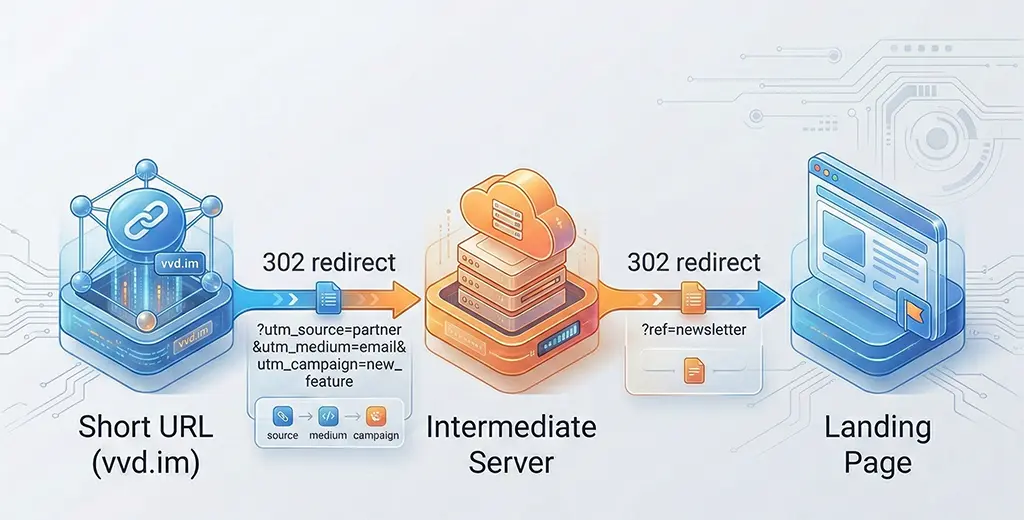
Why UTM Parameters Disappear: The Actual Mechanisms
There are four distinct failure modes, and each one leaves a different fingerprint. Confusing them wastes hours.
301 cached without query string. A browser that received a 301 from your short URL at some point in the past may replay that cached redirect directly from memory. If the cached Location header didn't include query parameters — because they weren't present when the 301 was first issued — the browser will never send them. This is the hardest one to diagnose because curl won't reproduce it; you need an actual browser in a fresh incognito session with DevTools open.
302 stripping on cross-scheme redirect. When a redirect crosses from HTTP to HTTPS, certain CDN configurations and some older nginx setups will issue a new request without preserving the query string. The RFC says the client must forward it, but implementations vary, and some corporate proxies actively strip query strings on scheme changes.
Application-level redirect that reconstructs the URL. A Spring Boot controller that reads the slug, looks up the destination, and does a RedirectView based on a hardcoded URL from the database — without appending the incoming query string — will silently drop everything. This is the most common failure mode I see in home-grown URL shorteners.
Nginx return directive ignoring $args. A return 302 https://destination.com/path; directive drops the query string entirely. You have to explicitly append $is_args$args to preserve it. The nginx docs mention this, but it's easy to miss when writing a quick rule.
Step-by-Step Diagnosis: Following the Query String Hop by Hop
The diagnostic approach is simple in principle: you need to see the actual HTTP response at every hop, not infer it from logs. curl -v --location-trusted shows you each redirect response including Location headers, but it follows all of them automatically. For debugging, you want to step through manually.
# Step through each hop manually — do not follow redirects automatically
# Replace the URL with your actual short link including UTM params

curl -v -s -o /dev/null \
  "https://vvd.im/abc123?utm_source=newsletter&utm_medium=email&utm_campaign=march2026"

# Capture the Location header from the response above, then call it directly:
curl -v -s -o /dev/null \
  "https://destination.example.com/landing?utm_source=newsletter&utm_medium=email&utm_campaign=march2026"

# At each step, look for:
# < HTTP/2 302
# < location: https://...
# Verify the location header contains your UTM params intact
Do this from a machine outside your network — ideally from a VPS in a different region — so you're not being affected by your own corporate proxy or any local DNS behavior. The point is to see exactly what a real browser would receive.
If the Location header in step one includes your UTM parameters and the second hop strips them, the problem is in what the destination server does with the incoming request. If the Location header in step one is already missing UTM parameters, the problem is in your short URL service itself.
Reading Nginx Access Logs to Confirm What Was Forwarded
Your Nginx access log, with the right log format, will tell you exactly what query string it received and what it forwarded. The default combined format doesn't show the full upstream URL. Change your log format temporarily during diagnosis:
# In your nginx.conf http block — add a debug log format
log_format utm_debug '$remote_addr - $request '
                     'args: "$args" '
                     'uri: "$uri" '
                     'location_sent: "$sent_http_location"';

# Apply it to the server block you're debugging
server {
    access_log /var/log/nginx/utm_debug.log utm_debug;

    location / {
        # your existing config
    }
}
After reloading Nginx (nginx -s reload), tail that log while making a test request. You'll see the args variable (which is the raw query string nginx received) and sent_http_location (what it put in the Location header). If args is populated but sent_http_location doesn't contain the query string, you've found the Nginx layer dropping them.
The fix for the Nginx return directive is straightforward:
# WRONG — drops query string entirely
return 302 https://destination.example.com/landing;

# CORRECT — appends query string if present, nothing if not
return 302 https://destination.example.com/landing$is_args$args;

# $is_args evaluates to "?" when $args is non-empty, "" when empty
# This prevents a trailing "?" on URLs with no query string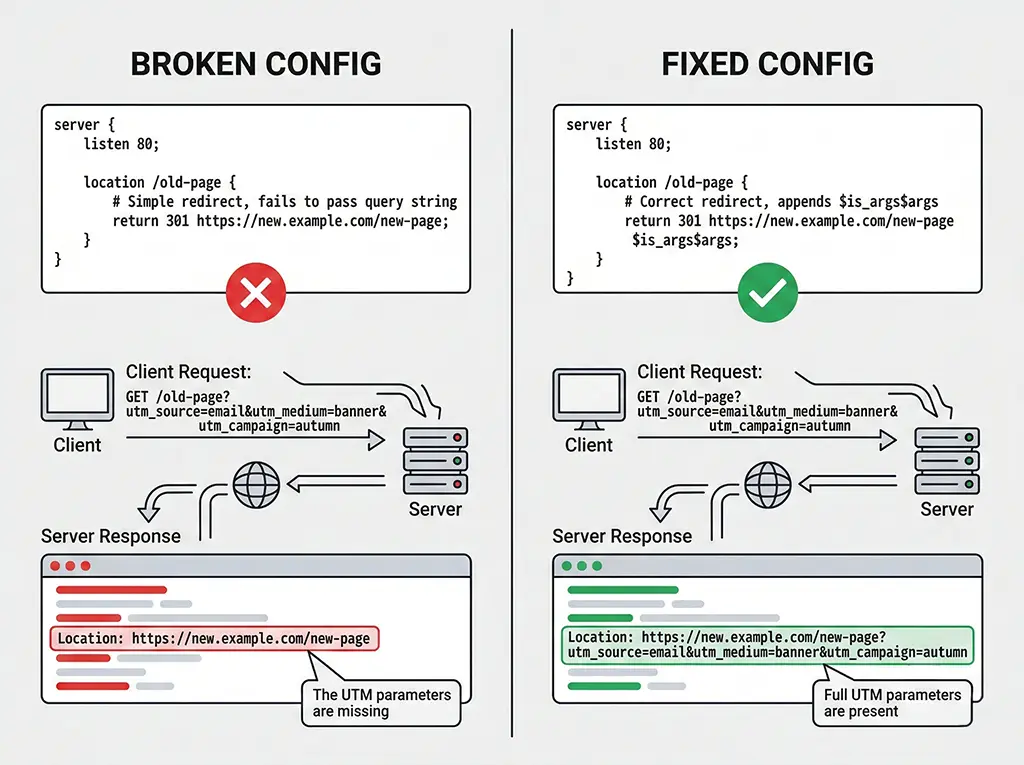
Fixing UTM Pass-Through in Spring Boot
If your short URL service runs on Spring Boot — as vvd.im does — the failure is almost always in how the redirect controller constructs the destination URL. The pattern that breaks things looks like this:
// BROKEN: reads the stored destination URL and redirects directly.
// Any query params on the incoming request are silently discarded.
@GetMapping("/{slug}")
public RedirectView expand(@PathVariable String slug) {
    String destination = urlRepository.findBySlug(slug)
        .orElseThrow(() -> new ResponseStatusException(HttpStatus.NOT_FOUND));
    return new RedirectView(destination);
}
The fix requires reading the incoming request's query string and appending it to the destination URL. There's a subtlety here: the stored destination URL may already have query parameters of its own (e.g., ?ref=homepage). You need to merge rather than blindly concatenate.
import jakarta.servlet.http.HttpServletRequest;
import org.springframework.web.util.UriComponentsBuilder;

@GetMapping("/{slug}")
public ResponseEntity expand(
        @PathVariable String slug,
        HttpServletRequest request) {

    String destination = urlRepository.findBySlug(slug)
        .orElseThrow(() -> new ResponseStatusException(HttpStatus.NOT_FOUND));

    String incomingQuery = request.getQueryString(); // raw query string, e.g. "utm_source=email&utm_campaign=march"

    String finalUrl;
    if (incomingQuery == null || incomingQuery.isBlank()) {
        finalUrl = destination;
    } else {
        // Use UriComponentsBuilder to safely merge query strings
        // This handles the case where destination already has its own params
        UriComponentsBuilder builder = UriComponentsBuilder.fromUriString(destination);

        // Parse incoming params and add each one individually
        // This avoids double-encoding issues with manual string concatenation
        UriComponentsBuilder incomingBuilder =
            UriComponentsBuilder.newInstance().query(incomingQuery);

        incomingBuilder.build().getQueryParams().forEach(builder::queryParam);

        finalUrl = builder.build(false).toUriString();
        // build(false) = do not encode again — params are already encoded
    }

    return ResponseEntity.status(HttpStatus.FOUND) // 302
        .header("Location", finalUrl)
        .header("Cache-Control", "no-store") // prevent 301-style caching issues
        .build();
}
Two things worth calling out here. First, build(false) skips re-encoding — if you use build(true), your percent-encoded characters will get double-encoded and GA4 will fail to parse them. Second, the Cache-Control: no-store header on your redirect responses is not optional if you want reproducible tracking. A 302 that gets cached by an aggressive CDN will replay without your current UTM parameters.
Verifying Redis Cache Doesn't Return Stale Destination URLs
If you cache your slug-to-destination mappings in Redis — which you should, given the read-heavy nature of redirect services — make sure you're not caching the final computed URL with UTM parameters baked in from a previous request. Cache only the base destination URL from the database and do the query-string merging in the controller on every request.
// In your caching layer — cache the RAW destination URL only
// Never cache the merged URL that includes incoming UTM params

@Service
public class UrlCacheService {

    private final RedisTemplate redis;
    private final UrlRepository urlRepository;

    private static final Duration TTL = Duration.ofMinutes(10);

    public String getDestination(String slug) {
        String cacheKey = "url:slug:" + slug;
        String cached = redis.opsForValue().get(cacheKey);
        if (cached != null) {
            return cached; // return raw destination, UTM merge happens in controller
        }
        String destination = urlRepository.findBySlug(slug)
            .orElseThrow(() -> new ResponseStatusException(HttpStatus.NOT_FOUND));
        redis.opsForValue().set(cacheKey, destination, TTL);
        return destination;
    }
}
Edge Cases That Will Catch You Later
The fix above covers the common path. Here are the failure modes that come up after you think you've solved it.
The destination uses a fragment (#) before query parameters. Some landing page builders generate URLs like https://example.com/page#section?utm_source=email. Browsers never send the fragment to the server — it's client-only — and the query string after a fragment is technically not a query string at all. UTM parameters placed after a hash are invisible to GA4. If you're receiving URLs from a third party that do this, you need to normalize them before storing.
URL-encoded ampersands in the stored destination. If someone stored the destination URL as https://example.com/?a=1&b=2 (HTML-encoded ampersand) rather than https://example.com/?a=1&b=2, your redirect will forward an HTML entity as a literal string and GA4 will fail to split the parameters. Always store and retrieve raw URLs, not HTML-escaped versions.
GA4's measurement protocol vs. browser-side collection. If you log UTM parameters server-side and plan to send them to GA4 via the Measurement Protocol as a backup, be aware that MP sessions are not the same as browser-collected sessions. GA4 will count them separately in some reports. Server-side logging is useful for your own attribution analysis, but it doesn't fix GA4 session attribution — that requires the UTM parameters to survive to the browser.
Mobile deep link intermediaries. If your redirect chain includes a mobile deferred deep link service (Branch, AppsFlyer, etc.), those services often strip and re-add UTM parameters on their own terms. What comes out the other end may be their own parameter format, not the original UTM set. You need to configure their pass-through settings explicitly, and verify using their own debug tools before assuming your upstream fix is sufficient.
The discipline here is the same as debugging any distributed system: assume nothing is working until you've verified it on the wire at each hop. Logs lie by omission. The actual HTTP response headers don't.