The default GA4 event taxonomy doesn't know you're running short links. It sees a page_view on your destination URL, maybe a referrer, and if your UTMs survived the redirect chain, a source/medium. What it doesn't see: which short code was clicked, how many milliseconds the redirect took, whether the click came from a known bot, or whether this is the third click from the same device on the same campaign link in 24 hours.
Those signals matter — not as vanity metrics, but as the connective tissue between your campaign investment and actual downstream conversions. Without them, you're doing attribution archeology: working backwards from a conversion, trying to figure out which campaign touch actually drove it.
I've gone through several iterations of the event schema for the vvd.im redirect service. What follows is the version I landed on and why, including the decisions I'd reverse if I were starting over.
Why Standard Events Fall Short for Short Link Use Cases
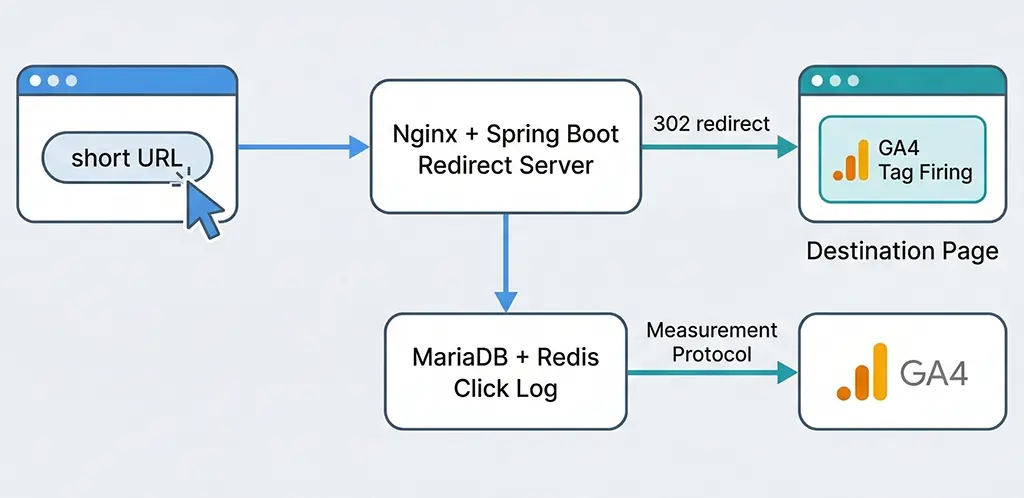
GA4's automatically collected events and the recommended enhanced measurement suite are built around the premise that your analytics code lives on the page the user lands on. For direct traffic or single-hop redirects to your own domain, this is fine. For short link campaigns, you have at minimum one intermediary domain — the shortener itself — and often two or three if you're going through ad platforms that add their own tracking parameters.
The problems this creates:
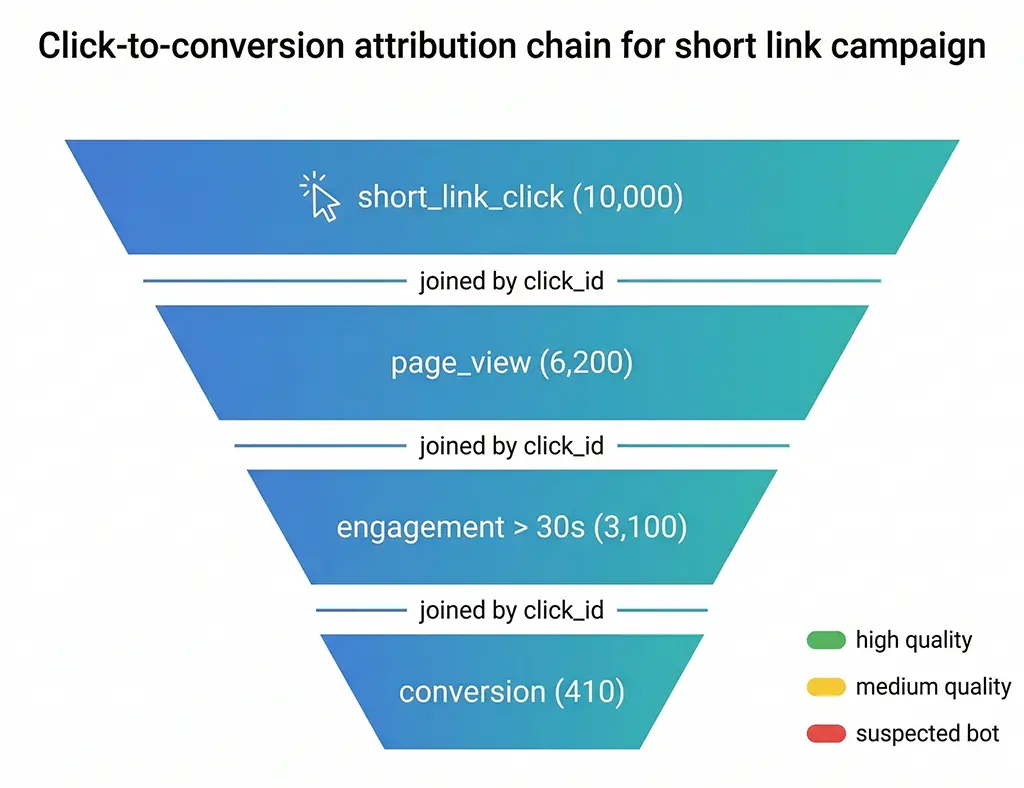
The redirect server sees every click; GA4 doesn't. Your Nginx access log captures every request. GA4 only fires when JavaScript executes successfully on the destination page. Bot traffic, crawlers, users who close the tab mid-redirect, and anyone with script blockers all vanish from GA4 entirely. Your server logs might show 10,000 clicks; GA4 reports 6,200 sessions. Neither number is wrong — they're measuring different things.
GA4 can't see the short code. On the destination page, you know the UTM parameters if they were appended to the destination URL. You don't know which vvd.im/abc123 link was clicked unless you explicitly pass that through. If the same campaign has ten different short links pointing to the same destination (different placements, A/B variants, partner attribution), GA4 will aggregate them all into a single source/medium tuple unless you build the event yourself.
Click quality signals require server-side context. Whether a click is from a known datacenter IP, a device that clicked 40 times in one hour, or a UA string that matches a scraper — none of this is available to the client-side GA4 tag. The redirect layer is the only place this logic can run, and the only way to get it into GA4 is through a Measurement Protocol event.
Designing the Event Schema Before Writing Any Code
The temptation when building custom events is to start with what's easy to collect and work backwards to meaning. Resist that. Start with the questions you need to answer:
- Which specific short link drove the most downstream conversions?
- Did click volume on this link increase after I changed the creative, or was the conversion lift just a timing artifact?
- Is there a difference in conversion rate between clicks from mobile and desktop on the same campaign?
- Are certain campaign links generating high click volume but low engagement past the landing page?
Each question implies a parameter. Working through these systematically before writing the Measurement Protocol call prevents the mess where you've logged 90 days of events and realize you're missing the dimension that would actually answer the question your stakeholder just asked.
The core event: short_link_click
I use a single primary event type for click-level data: short_link_click. Everything about the click is captured as parameters on this event rather than split across multiple event types. Here's the full parameter set:
// short_link_click event parameters
{
  // Link identity
  "short_code": "abc123",            // The slug portion of the short URL
  "short_url": "https://vvd.im/abc123",
  "destination_domain": "example.com",  // Domain only, not full URL (PII risk)

  // Campaign context (from the destination URL's UTM params)
  "utm_source": "newsletter",
  "utm_medium": "email",
  "utm_campaign": "spring-launch-2026",
  "utm_content": "hero-cta",
  "utm_term": "",

  // Click quality
  "is_bot_suspected": false,         // Based on UA + behavior heuristics
  "click_quality_score": 87,         // 0-100 internal scoring
  "ip_type": "residential",          // residential | datacenter | mobile | vpn

  // Device context (from UA parsing, not from client)
  "device_category": "mobile",
  "os_family": "iOS",
  "browser_family": "Safari",

  // Deduplication
  "click_id": "clk_8f2a9b3c",        // Unique per click for dedup in BigQuery
  "is_unique_24h": true,             // First click from this device hash in 24h
  "is_unique_lifetime": false        // Has this device hash clicked before?
}
A few decisions here worth explaining. I deliberately exclude the full destination URL from the event. If your destination URLs contain user identifiers, session tokens, or anything that looks like PII, logging them into GA4 creates a compliance problem that's painful to unwind. Domain only is sufficient for segmentation. If you need full URL analysis, do it in your server-side click log where you control the data lifecycle.
The click_quality_score is a 0-100 integer computed server-side before the event fires. It aggregates signals: known bot UA patterns, datacenter IP ranges, click frequency per device fingerprint, and whether the referrer matches the expected campaign channel. This lets me filter the GA4 report to "quality score above 70" and get a view of human traffic without hard-excluding anything from the raw data.
Sending Events via the Measurement Protocol
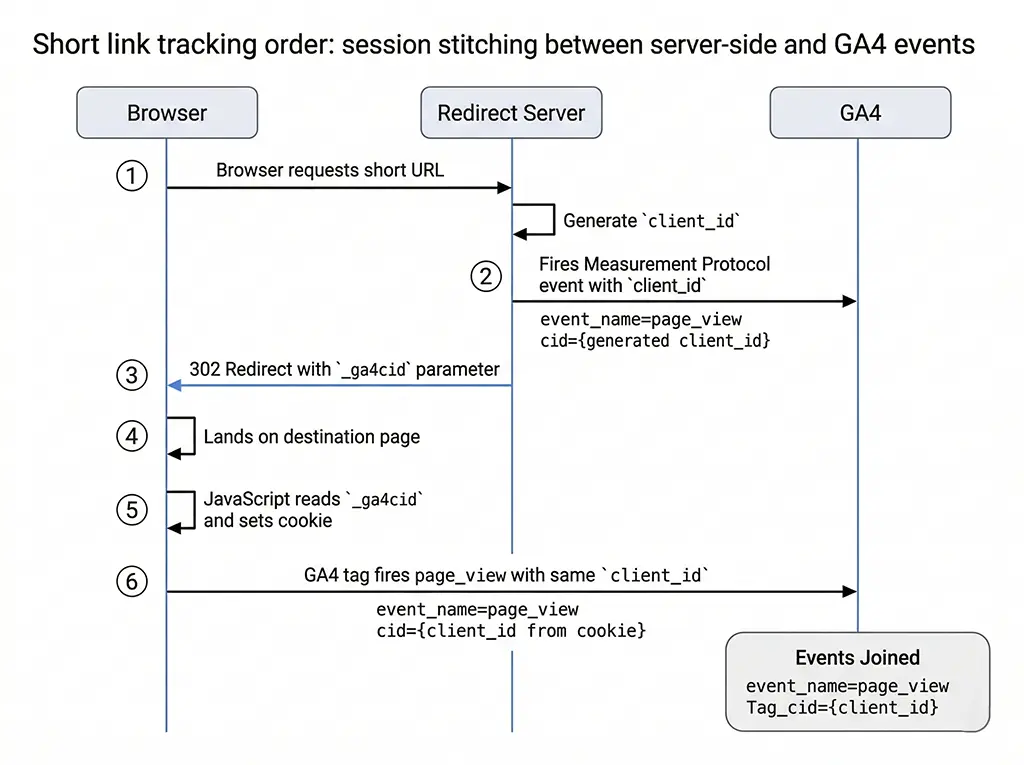
The Measurement Protocol is what makes server-side events possible, but GA4's implementation has some meaningful differences from Universal Analytics that bite people. Most importantly: you need a valid client_id, and that client_id needs to match what the destination page's GA4 tag will use for the same session. If they diverge, you'll see the server-side and client-side events as separate users in GA4.
My approach: pass the client_id as a query parameter on the destination URL during the redirect, read it client-side with a small JavaScript snippet, and store it in a first-party cookie. The short link redirect controller adds it:
// Spring Boot redirect controller excerpt
@GetMapping("/{shortCode}")
public ResponseEntity<Void> handleRedirect(
    @PathVariable String shortCode,
    HttpServletRequest request,
    HttpServletResponse response
) {
    ShortLink link = shortLinkService.resolve(shortCode)
        .orElseThrow(() -> new ShortCodeNotFoundException(shortCode));

    // Generate a click ID and a GA4 client_id for this click
    String clickId = clickIdGenerator.generate();         // "clk_" + random
    String ga4ClientId = ga4ClientIdGenerator.generate(); // standard format: timestamp.random

    // Log the click asynchronously to Redis (for real-time) and MariaDB (durable)
    clickLogService.logAsync(ClickEvent.builder()
        .shortCode(shortCode)
        .clickId(clickId)
        .ga4ClientId(ga4ClientId)
        .ipAddress(getClientIp(request))
        .userAgent(request.getHeader("User-Agent"))
        .referer(request.getHeader("Referer"))
        .build());

    // Fire Measurement Protocol event asynchronously (don't block redirect)
    ga4MeasurementProtocolService.fireEventAsync(
        GA4Event.shortLinkClick(clickId, ga4ClientId, link, request)
    );

    // Build destination URL with UTMs and GA4 client_id for session stitching
    String destinationUrl = UriComponentsBuilder.fromHttpUrl(link.getDestinationUrl())
        .queryParam("_ga4cid", ga4ClientId)  // picked up by client-side snippet
        .queryParam("_clkid", clickId)
        .build()
        .toUriString();

    return ResponseEntity.status(HttpStatus.FOUND)
        .header(HttpHeaders.LOCATION, destinationUrl)
        .header("Cache-Control", "no-store, no-cache, must-revalidate")
        .build();
}
The GA4MeasurementProtocolService handles the actual HTTP call to GA4:
@Service
public class GA4MeasurementProtocolService {

    private static final String MP_ENDPOINT =
        "https://www.google-analytics.com/mp/collect";

    @Value("${ga4.measurement-id}")
    private String measurementId;

    @Value("${ga4.api-secret}")
    private String apiSecret;

    private final WebClient webClient;

    public void fireEventAsync(GA4Event event) {
        // Using virtual threads (Java 25) for non-blocking I/O
        Thread.ofVirtual().start(() -> {
            try {
                Map<String, Object> payload = Map.of(
                    "client_id", event.getClientId(),
                    "timestamp_micros", String.valueOf(
                        System.currentTimeMillis() * 1000
                    ),
                    "events", List.of(Map.of(
                        "name", event.getEventName(),
                        "params", event.getParams()
                    ))
                );

                webClient.post()
                    .uri(MP_ENDPOINT + "?measurement_id={mid}&api_secret={sec}",
                         measurementId, apiSecret)
                    .contentType(MediaType.APPLICATION_JSON)
                    .bodyValue(payload)
                    .retrieve()
                    .bodyToMono(String.class)
                    .timeout(Duration.ofSeconds(3))
                    .subscribe(
                        resp -> log.debug("MP event sent: {}", event.getClickId()),
                        err  -> log.warn("MP event failed: {}", err.getMessage())
                    );
            } catch (Exception e) {
                log.error("MP event error for click {}: {}", event.getClickId(), e);
            }
        });
    }
}
Two things to note. First, the timeout is deliberately short at three seconds. The Measurement Protocol call is best-effort — if GA4 is slow or unreachable, you don't want this blocking your click log to MariaDB, which is the source of truth. The server-side log always wins; GA4 is a reporting layer. Second, using Java 25's virtual threads here means this scales to high click volumes without consuming a thread pool that's needed for request handling.
Client-Side Session Stitching on the Destination Page
The server fired the short_link_click event with a generated client_id. For this to join correctly with the page_view and subsequent events the destination page fires, the gtag on that page needs to use the same client_id. The mechanism: a small snippet that reads the _ga4cid parameter from the URL and passes it to the GA4 config call.
// Destination page snippet (Thymeleaf template on the landing page)
// Reads server-generated client_id from URL parameter if present
(function() {
  var url = new URL(window.location.href);
  var serverClientId = url.searchParams.get('_ga4cid');

  if (serverClientId) {
    // Store in cookie for subsequent page navigations in this session
    document.cookie = '_ga4cid=' + serverClientId
      + '; path=/; max-age=1800; SameSite=Strict';

    // Clean the parameter from the visible URL without reload
    url.searchParams.delete('_ga4cid');
    url.searchParams.delete('_clkid');
    history.replaceState({}, '', url.toString());
  }

  // Read from cookie as fallback (for multi-page sessions)
  function getStoredClientId() {
    var match = document.cookie.match(/_ga4cid=([^;]+)/);
    return match ? match[1] : null;
  }

  var clientId = serverClientId || getStoredClientId();

  // Initialize GA4 with the stitched client_id
  window.dataLayer = window.dataLayer || [];
  function gtag(){dataLayer.push(arguments);}
  gtag('js', new Date());
  gtag('config', 'G-XXXXXXXXXX', {
    client_id: clientId || undefined  // undefined = let GA4 generate its own
  });
})();
The history.replaceState call strips the _ga4cid and _clkid parameters from the browser's address bar after reading them. Without this, they'll appear in GA4's page_location dimension as separate URL variants, inflating your unique page count and making funnel reports messy. The cookie storage handles multi-page sessions: if the user navigates from the landing page to a second page, the GA4 tag on that page reads the cookie and maintains session continuity.
What happens when the destination is not your domain
If you're redirecting to a third-party destination — an affiliate URL, a marketplace listing, a partner's landing page — you can't run the stitching snippet. In that case, the Measurement Protocol event stands alone. You still get the click data in GA4, but it won't join with any session data from the destination. For conversion tracking, you'll need to rely on the UTM parameters and whatever conversion pixel the destination page fires independently.
For affiliate and partner redirects, I drop the session stitching entirely and rely on a separate reporting pipeline: click data from MariaDB, joined with conversion webhooks or postback URLs that the partner sends back. GA4 gets the click event for channel-level reporting; the conversion matching happens server-side.
Turning Click Events into Actionable Reports
Having well-designed events is only useful if you can query them efficiently. GA4's standard reports won't surface custom event parameters — you need Explorations or, better, BigQuery export.
Setting up the BigQuery export
Enable the BigQuery export in GA4's admin settings (it's free up to a certain daily export volume). Once enabled, your events land in a partitioned table structure: events_YYYYMMDD. The schema is flat but nested — parameters are stored as a repeated RECORD, which means querying them requires unnesting.
A query I use regularly to pull short link click performance by campaign:
-- BigQuery: Short link click performance by campaign, last 30 days
SELECT
  ep_short_code.value.string_value AS short_code,
  ep_utm_campaign.value.string_value AS utm_campaign,
  ep_utm_source.value.string_value AS utm_source,
  ep_device.value.string_value AS device_category,
  COUNT(*) AS total_clicks,
  COUNTIF(ep_unique_24h.value.int_value = 1) AS unique_clicks_24h,
  COUNTIF(ep_bot.value.int_value = 0) AS human_clicks,
  AVG(ep_quality.value.int_value) AS avg_quality_score

FROM `your-project.analytics_GXXXXXXXX.events_*`,
  UNNEST(event_params) AS ep_short_code
    WITH OFFSET AS off_sc,
  UNNEST(event_params) AS ep_utm_campaign
    WITH OFFSET AS off_uc,
  UNNEST(event_params) AS ep_utm_source
    WITH OFFSET AS off_us,
  UNNEST(event_params) AS ep_device
    WITH OFFSET AS off_dev,
  UNNEST(event_params) AS ep_unique_24h
    WITH OFFSET AS off_u24,
  UNNEST(event_params) AS ep_bot
    WITH OFFSET AS off_bot,
  UNNEST(event_params) AS ep_quality
    WITH OFFSET AS off_q

WHERE
  _TABLE_SUFFIX BETWEEN FORMAT_DATE('%Y%m%d', DATE_SUB(CURRENT_DATE(), INTERVAL 30 DAY))
                     AND FORMAT_DATE('%Y%m%d', CURRENT_DATE())
  AND event_name = 'short_link_click'
  AND ep_short_code.key = 'short_code'
  AND ep_utm_campaign.key = 'utm_campaign'
  AND ep_utm_source.key = 'utm_source'
  AND ep_device.key = 'device_category'
  AND ep_unique_24h.key = 'is_unique_24h'
  AND ep_bot.key = 'is_bot_suspected'
  AND ep_quality.key = 'click_quality_score'

GROUP BY 1, 2, 3, 4
ORDER BY total_clicks DESC
LIMIT 100;
The multiple UNNEST joins look verbose, but this is the standard pattern for extracting multiple custom parameters from a single event in GA4's BigQuery schema. If you're doing this frequently, materializing a view that pre-flattens your custom event parameters will save significant query cost over time.
Connecting clicks to conversions
The value of having a click_id parameter on your short_link_click event is that you can trace it forward to conversion events. When the destination page fires a purchase or generate_lead event, include the _clkid parameter that was passed in the URL. Now you have a join key between the two events in BigQuery, regardless of whether the GA4 session stitching worked perfectly.
// On the destination page: read click_id and attach to conversion events
var url = new URL(window.location.href);
var clickId = url.searchParams.get('_clkid');

// Attach to all subsequent events in this session
if (clickId) {
  gtag('set', { 'short_link_click_id': clickId });
}

// Later, when a conversion fires:
gtag('event', 'generate_lead', {
  'short_link_click_id': clickId,  // Will be on every event due to gtag 'set'
  'form_name': 'contact_form',
  'value': 0
});
Edge Cases That Will Eventually Break Your Schema
A few things that have bitten me in production that aren't obvious when you design the schema:
GA4's 25-parameter limit per event. Custom events can have at most 25 parameters. My schema above is at 14, which leaves room for growth, but if you start adding more context (geolocation, A/B test variant, referrer domain, etc.) you'll hit the ceiling. The solution: pack low-cardinality signals into a single string parameter, e.g. "click_flags": "unique_24h|residential|mobile". Less queryable than separate parameters, but it keeps you under the limit.
String parameter length truncation. GA4 truncates string parameter values to 100 characters. UTM campaign names are usually fine. Full destination URLs will get truncated. If you need full URLs in GA4, use BigQuery and pass the URL via a hash or ID that you resolve on your end.
Measurement Protocol events don't appear in DebugView. When you're testing the server-side event flow, DebugView is largely useless — it only shows client-side events from browsers with debug mode enabled. Use the Measurement Protocol Validation Endpoint first (https://www.google-analytics.com/debug/mp/collect) to confirm your payload is valid, then verify the events landed in BigQuery the next day. For real-time server-side monitoring, log the Measurement Protocol response codes to your application log alongside the click record.
The timestamp_micros field has a 72-hour window. GA4 will reject Measurement Protocol events timestamped more than 72 hours in the past. If you're replaying failed events from a queue (say, after a GA4 outage), anything older than three days won't land. Keep this in mind when designing your retry logic — don't retry indefinitely, and flag events that exceeded the window so they're tracked in your server-side logs even if GA4 never got them.
The event schema you build now will constrain your analysis options for as long as campaigns run under it. Changing parameter names mid-campaign means a break in historical data. The time spent on schema design upfront — particularly thinking through what questions you'll need to answer six months from now — pays back more than almost any other investment in the measurement stack.