The first time I saw a 60% gap between Google Ads conversion data and GA4 for the same campaign, I assumed something was broken. A week of debugging later, I understood that the gap wasn't a bug — it was the entirely predictable result of two systems making different, internally consistent choices about what a "conversion" is and when it gets counted.
That realisation didn't make the gap less annoying to explain to stakeholders. But it did mean I could stop chasing phantom setup errors and start understanding the actual mechanics behind each number. Once you understand those mechanics, you can decide which number to report for which purpose — and build a reconciliation layer that flags when the gap is growing unexpectedly.
The divergence comes from five distinct sources. They stack on top of each other, which is why the gap can look enormous even when everything is technically "working."
Different Denominators: Clicks vs. Sessions vs. Users
The most fundamental difference is what each platform puts in the denominator of its conversion rate calculation.
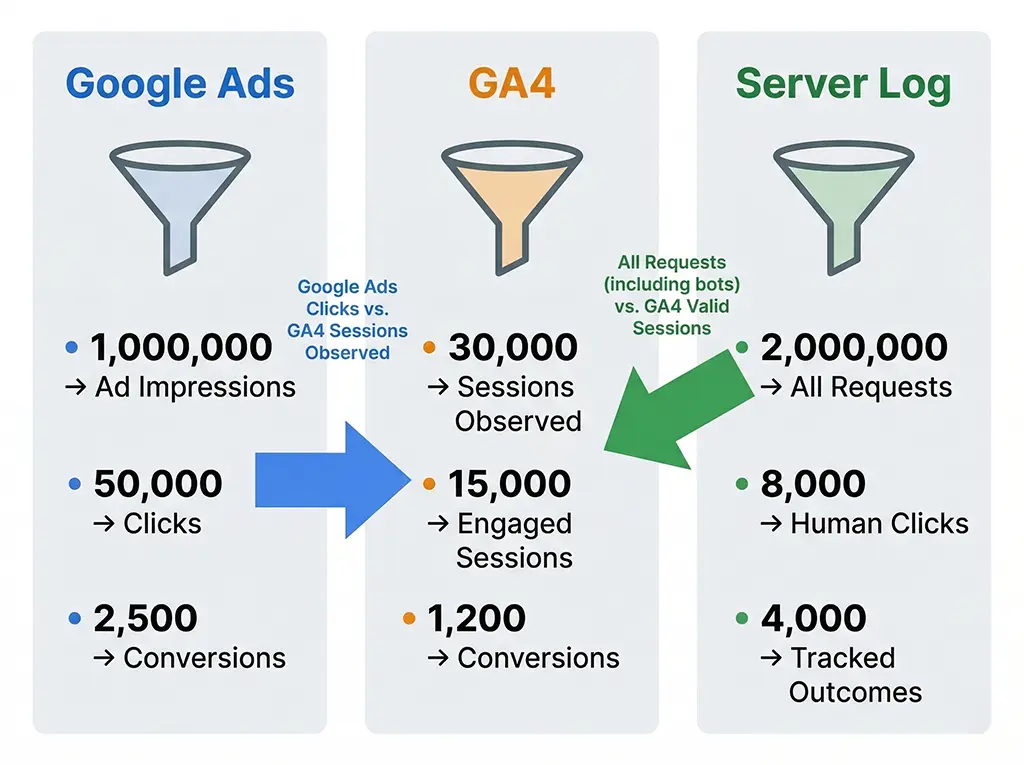
Google Ads divides conversions by clicks. One click on an ad = one unit in the denominator, regardless of whether that click resulted in a session GA4 recorded, whether the user bounced before the page loaded, or whether the same user clicked the ad three times in a week. The denominator is owned entirely by Google Ads and is based on its own click log.
GA4 divides conversions by sessions (in the default Sessions report) or by users (in the User report), and it only counts sessions and users it actually observed — meaning the GA4 tag fired and sent a hit. Any session where the tag didn't fire (ad blocker, JavaScript disabled, page load abandoned before tag executes) is invisible to GA4 but not to Google Ads.
In practice, 10–20% of web traffic never produces a GA4 hit due to tag blockers and load failures. If Google Ads records 1,000 clicks, GA4 might see 820 sessions from those clicks. That alone accounts for a conversion rate gap of roughly 20% before any other factors enter the picture.
For short link campaigns running through a redirect service, there's an additional layer: the click log on the redirect server records every HTTP request to the short link, including bot traffic, link preview crawlers, and clicks that bounce at the redirect hop before the destination page loads. Your server-side click count will always be higher than either Google Ads or GA4 because it catches traffic neither downstream system records.
-- Query: Compare click sources for the same campaign period
-- Run against your MariaDB click log to identify denominator gaps

SELECT
    DATE(clicked_at) AS click_date,
    COUNT(*) AS server_clicks,
    SUM(CASE WHEN user_agent NOT LIKE '%bot%'
             AND user_agent NOT LIKE '%crawler%'
             AND user_agent NOT LIKE '%spider%'
             THEN 1 ELSE 0 END) AS human_clicks,
    -- human_clicks is your best proxy for what GA4 should see
    -- compare against GA4 sessions from utm_source/utm_medium
    campaign_utm_source,
    campaign_utm_medium,
    campaign_utm_campaign
FROM click_log
WHERE campaign_utm_campaign = 'march_promo'
  AND clicked_at BETWEEN '2026-03-01' AND '2026-03-07'
GROUP BY click_date, campaign_utm_source, campaign_utm_medium, campaign_utm_campaign
ORDER BY click_date;
Running this query and comparing the human_clicks column against GA4's session count for the same campaign gives you a concrete measure of tag fire rate. If the ratio drops below 75%, investigate before drawing any conclusions from conversion rate comparisons — your measurement foundation is too leaky.
Attribution Windows and Cross-Session Conversion Credit
The second source of divergence is attribution window length and how each system handles conversions that happen in a different session from the original ad click.
Google Ads, by default, uses a 30-day click attribution window for most conversion actions. If a user clicks your ad today and converts 25 days later, Google Ads credits that conversion to today's click. The conversion shows up in your Google Ads report attributed to the campaign that drove the original click.
GA4's default attribution model is last-click within a 90-day lookback window for non-direct traffic. But here's where the behaviour diverges in practice: GA4 attributes conversions based on the session in which the conversion event fired. If a user clicked your ad on March 1st, visited organically on March 15th, and converted during that organic session, GA4's session-scoped report credits the conversion to organic search — not to the original paid campaign.
Google Ads, by contrast, looks back 30 days and finds the ad click, then credits it to the campaign. Same conversion, two different channel attributions. Neither is wrong; they're applying different models.
This gap is particularly pronounced for products with long consideration cycles. A SaaS product where users typically convert 2–3 sessions after first touch will show a much larger GA4 vs. Google Ads discrepancy than an ecommerce site where most conversions happen in the same session as the first click.
In GA4's Advertising section (under Attribution > Model Comparison), you can switch the attribution model for GA4's conversion reports. Switching from last-click to data-driven attribution, or aligning the lookback window with Google Ads' settings, will close some of this gap — but not all of it, because the fundamental session vs. click denominator difference persists regardless of model.
Conversion Counting: Every Event vs. One Per Session
Google Ads, by default, counts every conversion action that fires during the attribution window. If a user clicks your ad and then completes your lead form three times in a week (unusual but not impossible for certain business types), Google Ads records three conversions against that click. You can configure Google Ads to count only one conversion per click window per user, but the default is every conversion.
GA4 also counts every conversion event by default, but it reports conversion rates at the session level: a session that contained at least one conversion event is a "converting session." Multiple conversion events in the same session count as one converting session in GA4's session conversion rate metric.
The practical consequence: for campaigns where users might convert multiple times (email subscription + purchase, form submission + call booking), Google Ads conversion count will be inflated relative to GA4's session conversion rate. The correct response is to audit your Google Ads conversion actions and ensure you're counting what you intend to count — usually "one per click window" for lead generation actions.
// Check how many users fired your conversion event multiple times in a session
// Run this in GA4's Explore report or BigQuery export

-- BigQuery example: identify multi-conversion sessions
SELECT
  user_pseudo_id,
  ga_session_id,
  COUNT(*) AS conversion_events_in_session,
  MIN(event_timestamp) AS first_conversion_ts,
  MAX(event_timestamp) AS last_conversion_ts
FROM `your_project.analytics_XXXXXXXX.events_*`
WHERE _TABLE_SUFFIX BETWEEN '20260301' AND '20260307'
  AND event_name = 'generate_lead'  -- your conversion event name
GROUP BY user_pseudo_id, ga_session_id
HAVING COUNT(*) > 1
ORDER BY conversion_events_in_session DESC
LIMIT 50;
If this query returns a significant number of rows, you have a double-counting problem somewhere — either users are legitimately converting multiple times (audit your form logic) or the conversion event is firing more than once per user action (audit your tag trigger conditions in GTM or your gtag call placement).
Modelled Conversions and Consent Mode Gaps
Since iOS 14 and the broader shift toward consent-based tracking, both Google Ads and GA4 have introduced conversion modelling to fill gaps where tracking consent was withheld. This modelling affects the two platforms differently and is a major source of unexplained divergence that most teams don't account for.
Google Ads uses enhanced conversions and consent mode v2 to model conversions for users who declined tracking consent. When you have consent mode enabled, Google Ads will report modelled conversions alongside observed ones. The total conversion count in Google Ads is therefore observed + modelled, but this total isn't broken out by default in the standard conversion columns — you have to add the "Modelled conversions" column explicitly to see what share of your reported conversions are modelled estimates.
GA4 also applies modelling under consent mode, but it does so at the session and user level rather than at the conversion event level. GA4 models the behaviour of users who declined consent by extrapolating from users who did consent and exhibited similar pre-consent signals. The modelled sessions appear in your GA4 reports without a separate label, folded into your standard session and user counts.
The two platforms model independently, using different signals and different methodologies. It is entirely possible — and in my experience, common — for Google Ads to model 200 additional conversions from consent-declined users while GA4 models 120 additional sessions from the same consent pool, producing a structural conversion rate gap that has nothing to do with implementation errors.
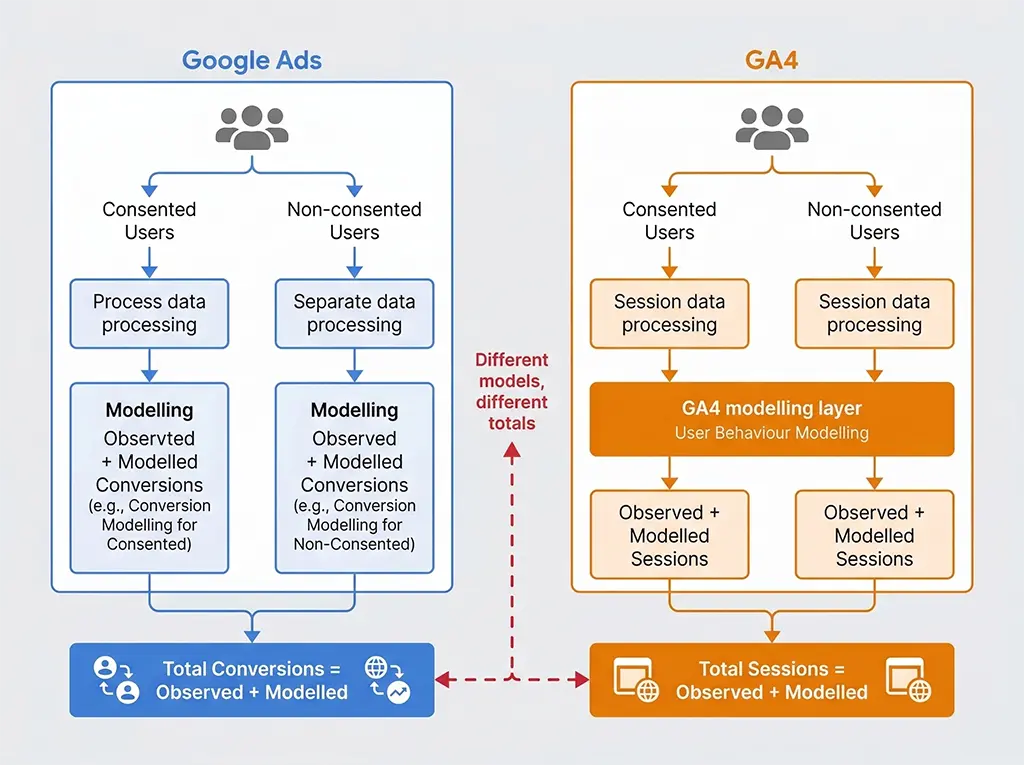
To get visibility into how much of your Google Ads conversion volume is modelled, navigate to Google Ads → Campaigns → Columns → Modify columns → Conversions, and add "Modelled conversions." If modelled conversions account for more than 30% of your total, your Google Ads conversion data is substantially estimated, and direct numerical comparison with GA4 is not meaningful without a modelling-aware reconciliation approach.
Building a Practical Reconciliation Layer
After running enough campaigns to have seen every flavour of this discrepancy, my approach is to stop trying to make the numbers match and instead build a reconciliation layer that explains the gap structurally.
The reconciliation layer lives in a MariaDB table that aggregates three data sources for each campaign, daily: server-side click logs (from Redis → MariaDB ETL), GA4 BigQuery export, and Google Ads API data. The goal isn't a single "true" conversion rate — it's a set of metrics that each measure something precise.
-- Reconciliation table schema
CREATE TABLE campaign_reconciliation (
    id BIGINT AUTO_INCREMENT PRIMARY KEY,
    report_date DATE NOT NULL,
    campaign_id VARCHAR(64) NOT NULL,
    utm_source VARCHAR(128),
    utm_medium VARCHAR(128),
    utm_campaign VARCHAR(256),

    -- Server-side: ground truth for clicks
    server_clicks_total INT DEFAULT 0,       -- all requests
    server_clicks_human INT DEFAULT 0,       -- bot-filtered

    -- GA4 (from BigQuery export): session-scoped view
    ga4_sessions INT DEFAULT 0,
    ga4_converting_sessions INT DEFAULT 0,
    ga4_conversion_events INT DEFAULT 0,     -- can exceed sessions
    ga4_session_cvr DECIMAL(8,4),            -- converting_sessions / sessions

    -- Google Ads API: click-and-window view
    gads_clicks INT DEFAULT 0,
    gads_conversions DECIMAL(10,2) DEFAULT 0,   -- includes modelled
    gads_conversions_observed INT DEFAULT 0,     -- observed only
    gads_cvr DECIMAL(8,4),                       -- conversions / clicks

    -- Derived reconciliation metrics
    tag_fire_rate DECIMAL(8,4),              -- ga4_sessions / server_clicks_human
    modelled_share DECIMAL(8,4),             -- (gads_conversions - gads_conversions_observed) / gads_conversions
    attribution_window_gap INT,              -- gads_conversions_observed - ga4_converting_sessions (same-session)

    updated_at TIMESTAMP DEFAULT CURRENT_TIMESTAMP ON UPDATE CURRENT_TIMESTAMP,
    INDEX idx_campaign_date (campaign_id, report_date),
    INDEX idx_utm (utm_source, utm_medium, utm_campaign, report_date)
);
With this table populated daily, the reconciliation workflow becomes mechanical: check tag_fire_rate first (should be ≥ 0.80; below that, investigate tag firing issues before comparing conversion rates), then check modelled_share (above 0.30 means Google Ads conversion data is substantially estimated), then examine attribution_window_gap (large positive values mean users convert in later sessions, which is a product consideration as much as a measurement one).
The most important outcome of this approach: you stop reporting a single "conversion rate" and start reporting the right metric for the right audience. Google Ads optimisation decisions should use Google Ads data, which accounts for its own attribution window. Business performance reporting should use GA4 session conversion rate, which reflects what users actually do on your site. Server-side click logs are the arbiter for total reach and tag quality.
The gap between platforms isn't a problem to fix. It's information — about your users' consideration cycles, your tag reliability, and the share of your audience that's opted out of tracking. Reading it correctly is more useful than papering over it with a blended number that doesn't mean anything precise.