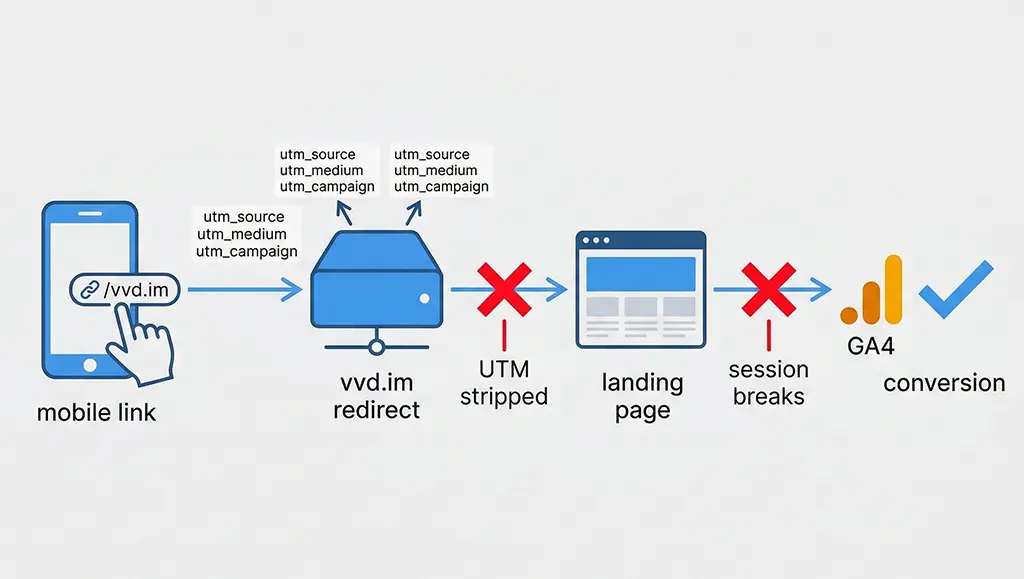
Every short link campaign I've run has the same invisible flaw baked in from the start: the redirect layer sits between the click and the conversion, and unless you've explicitly accounted for it, attribution degrades somewhere along the way. GA4 marks the session as (direct) / (none), your channel report understates paid by 15–30%, and the conversion event fires against the wrong source entirely.
The frustrating part is that this failure is silent. The conversion still registers. GA4 still shows a number. The problem only surfaces when you compare channel performance against ad platform reports and the numbers refuse to reconcile.
This article covers what actually has to happen — at the Nginx level, in the Spring Boot redirect controller, and in your GA4 event schema — for conversion attribution to survive the short link hop intact.
Why Short Links Break GA4 Attribution by Default
GA4 attribution depends on UTM parameters arriving on the landing page URL in the user's browser. When a short link redirects to a destination, there are at least two ways those parameters can disappear before GA4's gtag.js initialises.
The first is the redirect itself. A 301 permanent redirect cached in the browser sends users directly to the destination URL — bypassing your server entirely — and with no server involvement there's nothing to append UTM parameters that weren't in the original cached URL. The second is parameter stripping at the application or CDN layer on the destination side: many landing page platforms and some ad networks strip or rewrite query strings on inbound requests.
But the failure mode I see most often with short link services is subtler: the redirect preserves UTM parameters correctly, but the destination page fires a page_view event before the URL query string has been parsed. When that happens, GA4 attributes the session to (direct) because the measurement protocol sends whatever traffic source is in scope at the moment of the first event, and if that first event fires before utm_source is read, the source is empty.
There's also the cross-scheme problem: if your short link resolves over HTTP and the destination is HTTPS, the Referer header is dropped by the browser. That matters less for UTM-based attribution (UTMs don't rely on referrer) but it does affect GA4's automatic traffic source detection for non-UTM links, and it can cause session_traffic_source_last_click to record incorrectly.
Server-Side Configuration That Actually Preserves Parameters
The redirect controller is the single point where you have full control over what reaches the destination URL. For vvd.im, I route all short link resolution through a Spring Boot controller behind Nginx. The Nginx configuration determines whether query parameters survive the proxy layer; the Spring Boot controller determines whether UTM parameters are correctly forwarded to the destination.
Starting with Nginx — the most common misconfiguration I've encountered:
# Wrong: drops query string on rewrite
location ~* ^/([a-zA-Z0-9]+)$ {
    rewrite ^/(.*)$ /redirect/$1 last;
}

# Correct: preserve args through the internal rewrite
location ~* ^/([a-zA-Z0-9]+)$ {
    rewrite ^/(.*)$ /redirect/$1$is_args$args last;
}
The $is_args variable resolves to ? when there are query parameters and to an empty string when there aren't. Without it, Nginx appends a literal trailing ? on requests that have no args, which some downstream parsers treat as a malformed URL. This is a real production detail the documentation doesn't emphasise: always use $is_args$args, never just $args.
In the Spring Boot redirect controller, I use a whitelist approach to forward UTM parameters rather than forwarding all query parameters. Forwarding everything leaks session tokens, internal tracking IDs, and any other parameters the original URL might carry:
@GetMapping("/{shortCode}")
public ResponseEntity resolveShortLink(
        @PathVariable String shortCode,
        @RequestParam MultiValueMap allParams,
        HttpServletRequest request) {

    // Fetch the destination URL from Redis (fast path) or MariaDB
    String destination = resolveDestination(shortCode);
    if (destination == null) {
        return ResponseEntity.notFound().build();
    }

    // Whitelist: only forward these parameters to the destination
    Set utmParams = Set.of(
        "utm_source", "utm_medium", "utm_campaign",
        "utm_term", "utm_content", "utm_id"
    );

    UriComponentsBuilder builder = UriComponentsBuilder.fromUriString(destination);

    allParams.forEach((key, values) -> {
        if (utmParams.contains(key.toLowerCase())) {
            // Merge: don't overwrite destination UTMs if they already exist
            builder.queryParamIfAbsent(key, values.toArray());
        }
    });

    // Log the click asynchronously to Redis before redirecting
    logClickAsync(shortCode, request, allParams);

    // 302: prevents browser caching that would bypass click logging
    return ResponseEntity.status(HttpStatus.FOUND)
            .location(URI.create(builder.toUriString()))
            .build();
}
Two details worth unpacking here. First, queryParamIfAbsent is intentional: if the destination URL already contains utm_source, I don't overwrite it. This is the right default for a short link service — the link creator set those parameters deliberately, and the redirect service shouldn't clobber them. Second, the 302 response code is non-negotiable for campaign links. A 301 gets cached by browsers; once cached, subsequent clicks skip the server entirely, which means your click log in Redis never fires and your conversion counts become unreliable.
Structuring GA4 Conversion Events for Short Link Campaigns
With the redirect layer sorted, the GA4 side has its own set of landmines. The most common one: marking too many events as conversions, then finding that GA4's attribution model assigns conversion credit to whichever source happened to fire last — not the source that drove the click on your campaign link.
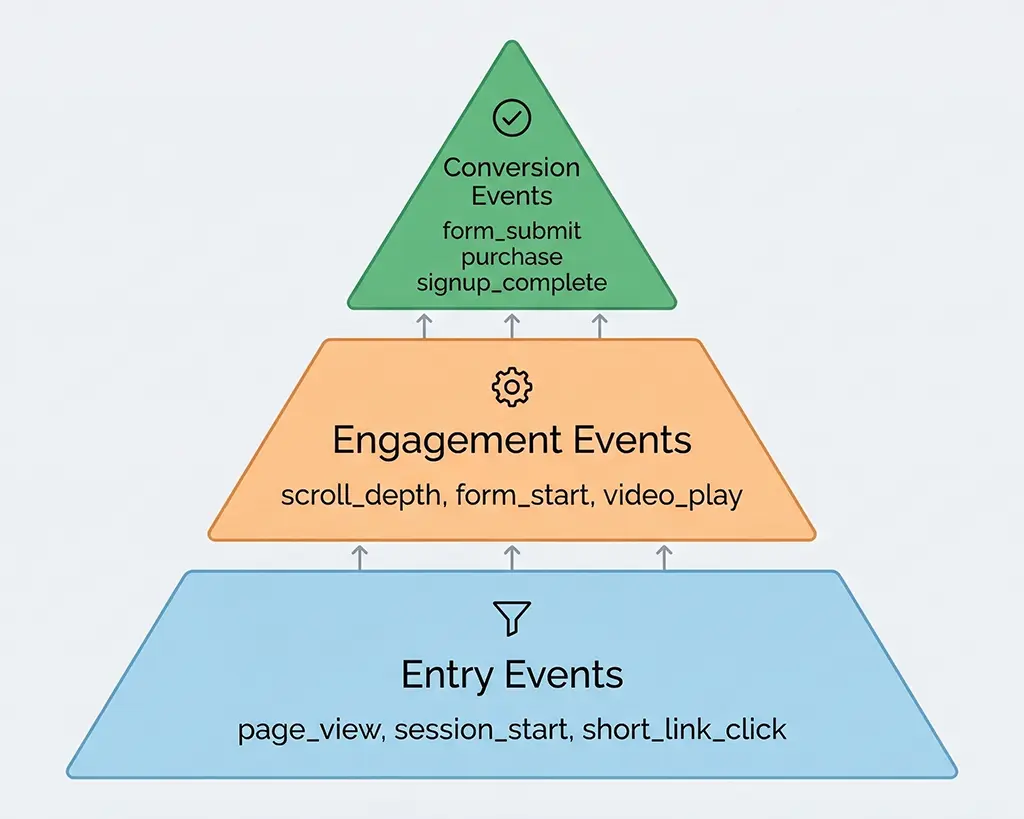
For short link campaigns, I use a strict three-tier event schema:
Tier 1 — Entry events (not conversions): short_link_click, page_view, session_start. These confirm the attribution chain is intact but carry no conversion weight.
Tier 2 — Engagement events (not conversions): scroll depth milestones, form starts, video plays. Useful for funnel analysis but marking them as conversions inflates the count and muddies multi-touch attribution.
Tier 3 — Outcome events (conversions): form submissions, purchases, sign-ups, trial activations. These are the only events that should be toggled as conversions in GA4's admin panel.
The event parameter structure matters as much as the event name. For each outcome event, I include these parameters to preserve the attribution chain in GA4's reports:
// Fire on successful form submission or purchase confirmation
gtag('event', 'generate_lead', {
  // Campaign attribution — read from URL params on page load
  campaign_source: getUtmParam('utm_source'),
  campaign_medium: getUtmParam('utm_medium'),
  campaign_name: getUtmParam('utm_campaign'),
  campaign_id: getUtmParam('utm_id'),

  // Short link metadata — passed from server-side click log
  short_link_code: getMetaParam('vvd_code'),
  short_link_destination: getMetaParam('vvd_dest'),

  // Conversion context
  form_id: formElement.id,
  conversion_page: window.location.pathname,

  // Value — required for ROAS reporting, even if it's an estimate
  value: 1.0,
  currency: 'USD'
});

// Helper: read UTM from URL on page load, fall back to sessionStorage
function getUtmParam(name) {
  const url = new URLSearchParams(window.location.search);
  const fromUrl = url.get(name);
  if (fromUrl) {
    sessionStorage.setItem(name, fromUrl);
    return fromUrl;
  }
  // If UTM wasn't in the URL (e.g. navigated internally), recover from storage
  return sessionStorage.getItem(name) || '';
}
The sessionStorage fallback is something I added after seeing a common failure case: a user clicks your campaign link, lands on the homepage with UTMs in the URL, then navigates to an interior page where the conversion form lives. The interior page URL has no UTMs. If you read UTMs only from the current URL when the conversion fires, you get nothing. The fix is to persist UTMs to sessionStorage on the first page load and read from there on subsequent pages within the same session.
Validating Attribution Integrity Before You Go Live
There's a specific sequence I run before marking any short link campaign as live. It takes about 20 minutes and has saved me from silent attribution failures more times than I can count.
Step 1: Verify the redirect chain end-to-end with curl. Check that UTM parameters survive the full redirect chain and land on the destination URL:
# Follow all redirects, print final URL with headers
curl -Ls -o /dev/null -w "Final URL: %{url_effective}\nHTTP status: %{http_code}\n" \
  "https://vvd.im/abc123?utm_source=email&utm_medium=newsletter&utm_campaign=march_promo"

# Expected output:
# Final URL: https://example.com/landing?utm_source=email&utm_medium=newsletter&utm_campaign=march_promo
# HTTP status: 200

# Confirm it's a 302 (not 301) at the short link hop
curl -I "https://vvd.im/abc123?utm_source=email&utm_medium=newsletter"
# Look for: HTTP/2 302
Step 2: Enable GA4 DebugView and fire the conversion event manually. Open the landing page with ?_gl= debug mode active (or use GTM's preview mode), complete the conversion action, and confirm the event appears in DebugView with the correct campaign_source parameter. If campaign_source is empty, the UTM is getting lost before your gtag helper reads it.
Step 3: Cross-reference the server-side click log. The Redis click log captures the UTM state at redirect time, independent of the browser. If your Redis log shows UTMs correctly but GA4 shows direct traffic, the problem is in the JavaScript layer — most likely the sessionStorage fallback isn't firing, or gtag is initialising before your UTM reader runs. If the Redis log is also missing UTMs, the problem is in the Nginx or Spring Boot layer.
Step 4: Check session_traffic_source_last_click in GA4 DebugView. This is the attribution dimension GA4 uses for conversion credit. It's populated at session start, not at event time, which means if the session was already active when the conversion fired (e.g. a returning visitor), the traffic source might reflect a previous session's attribution. For new session validation, always test in an incognito window with no existing GA4 cookies.
The Attribution Cliff at Campaign End
One scenario that doesn't get enough coverage: what happens to conversion attribution after your campaign ends and you stop sending traffic to the short link? If you've been using the same short link across multiple campaigns by changing the destination URL — a pattern some teams use to "reuse" branded short links — you'll have a problem.
GA4's session_traffic_source_last_click is set at session start. If a user clicked your campaign link in a previous session and returns directly to your site in a new session, the new session gets attributed to direct, not to the original campaign. This is by design: GA4's attribution model doesn't retroactively credit old sessions. But it means your campaign's conversion numbers are always understated relative to its actual contribution, because some users take multiple sessions to convert.
The practical implication for short link campaigns: never reuse a short link code across different campaigns. Each campaign should have its own short link code, and your Redis/MariaDB schema should record the campaign metadata against the code, not just the destination URL. That way, even after the campaign ends, you can correlate server-side click logs (which you own permanently) with GA4 conversion data via the short_link_code event parameter.
Attribution will always be approximate. But closing the gap between "what our server logged" and "what GA4 credited" is a solvable engineering problem, and the solution starts at the redirect layer, not in the GA4 admin panel.