Most GA4 accounts I've looked at closely show attribution differences that are either trivially small or concentrated in one channel. You swap from last-click to data-driven, reload the Advertising snapshot, and the numbers shift by a few percent across the board. You shrug, maybe call it an improvement, and move on. That's actually a reasonable response if your conversion volume is low and your customer journeys are short. But if those conditions aren't met, using the wrong model can lead to real budget misallocation — money moved away from channels that are doing meaningful assist work toward whichever channel happens to close the deal.
This article isn't going to explain what attribution is or why it matters in principle. Instead, I want to get into the mechanics of when these two models actually produce different outputs, what that divergence means operationally, and how to tell which situation you're in before you decide to change anything.
How the Two Models Actually Work Inside GA4
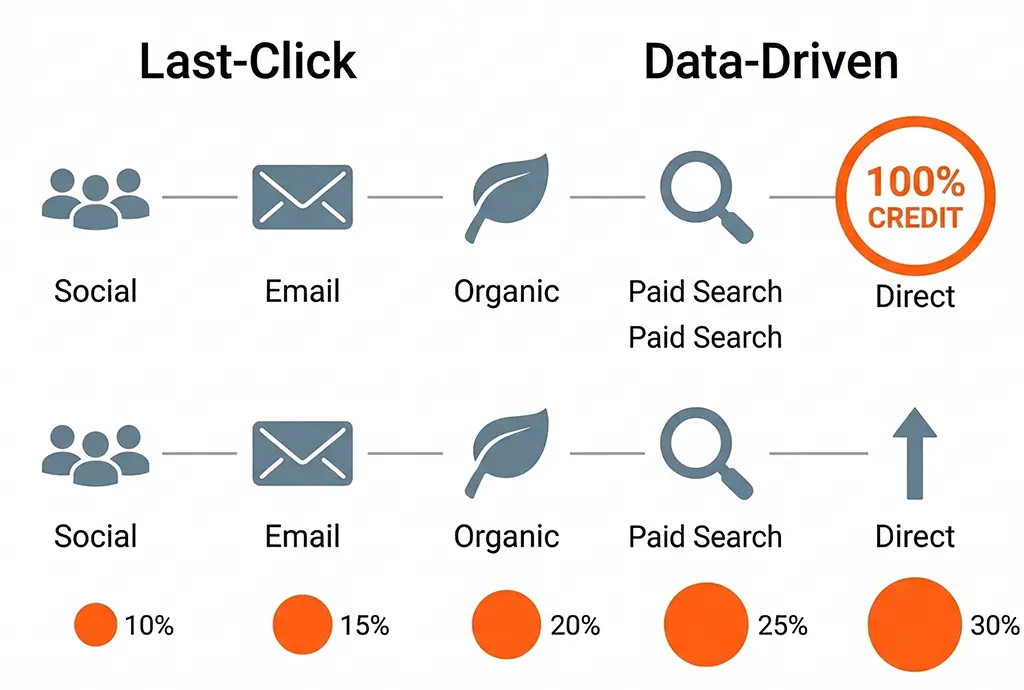
Last-click in GA4 assigns 100% of conversion credit to the final non-direct channel that touched the user before converting. "Non-direct" is the operative word: if the last session was direct but there was a prior identified session, GA4 steps back and credits that earlier channel. This is different from how Universal Analytics handled last-click in some reporting views, so if you're comparing numbers across a migration, that behavioral difference is worth accounting for.
Data-driven attribution (DDA) uses a machine learning model trained on your account's own conversion path data. It compares paths that converted against similar paths that didn't, and assigns fractional credit based on how much each touchpoint appears to influence the conversion outcome. Google doesn't publish the exact algorithm, but the general approach is a Shapley value calculation — rooted in cooperative game theory — where each channel's contribution is estimated by measuring what happens to conversion probability when that channel is present versus absent in the path.
The key threshold to know: DDA requires at least 400 conversions per conversion event over 30 days, across a variety of path types, before GA4 will even apply it. Below that, GA4 silently falls back to last-click even if you've selected DDA as your model. You can confirm which model is actually active by checking under Admin → Attribution Settings and looking at the conversion volume indicator for each conversion event.
What "Path Data" GA4 Actually Has Access To
DDA works on the touchpoint history GA4 can observe — which is the session-level channel data within the attribution lookback window (default: 30 days for most conversions, 90 days configurable). It only sees touchpoints where GA4 collected a session. It doesn't see:
- Impressions that didn't result in a click or session
- Cross-device sessions that aren't connected via User-ID or Google signals
- Sessions where the UTM was lost in a redirect chain before GA4 collected it
- Offline interactions of any kind
This matters because if you're running heavy upper-funnel display or video spend that primarily influences behavior without generating tracked sessions, DDA has no data about it and won't credit it. From DDA's perspective, that spend doesn't exist. Last-click won't credit it either, but at least with last-click you know what you're getting: the simplest possible model. DDA, by contrast, can create a false sense of analytical sophistication when its input data has significant gaps.
The Conditions That Make the Models Diverge Meaningfully
Through operating vvd.im's own campaign tracking and analyzing attribution data for campaigns run through the service, I've found that the model divergence becomes actionable under a fairly specific set of conditions. Most accounts won't hit all of them simultaneously, but understanding them helps you evaluate your own situation.
Long Average Path Lengths
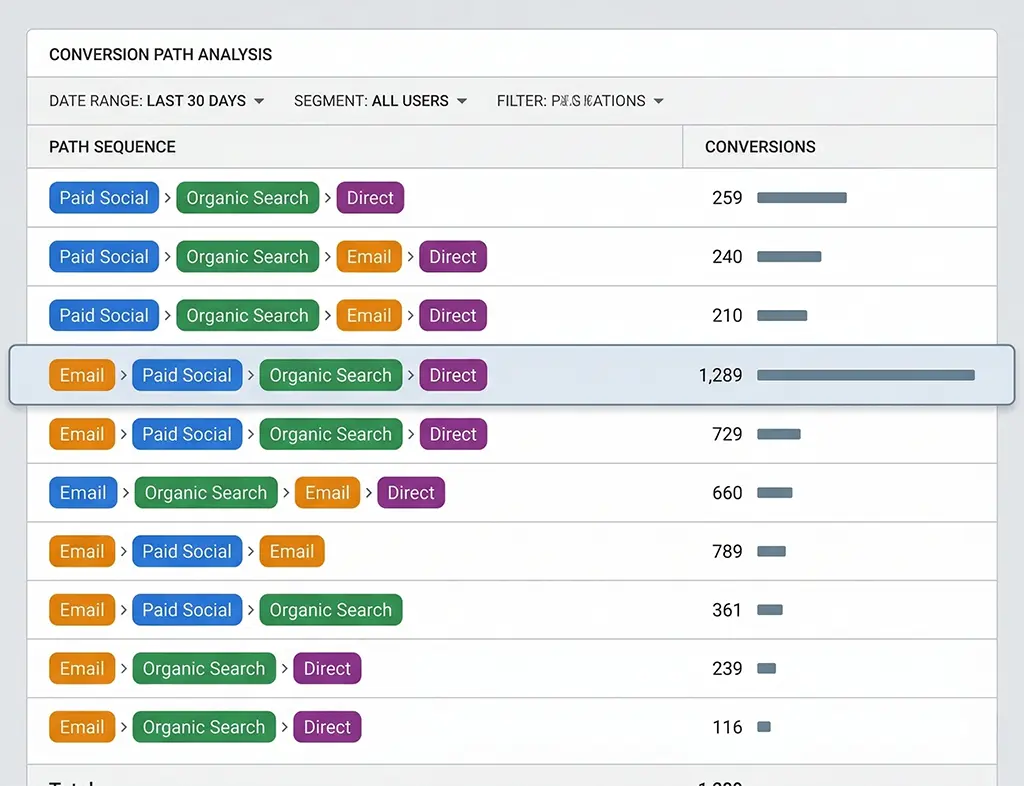
If your median path to conversion involves three or more distinct channel touchpoints, last-click is systematically undervaluing everything that isn't the closer. The longer the average path, the more pronounced this bias. You can check your path lengths in GA4 under Advertising → Attribution → Paths. If the distribution is skewed toward one or two touchpoints for the majority of conversions, the models will largely agree. If you have substantial conversion volume coming through paths of five or more touchpoints, the disagreement will be significant.
A Channel That Consistently Appears Mid-Funnel but Rarely Closes
This is the classic symptom that DDA is supposed to fix. If you're running paid social that reliably shows up at positions two and three in conversion paths but almost never appears as the last touchpoint, last-click is assigning it roughly zero credit. DDA will assign it fractional credit based on how often conversions occur in paths that included that social touchpoint versus similar paths that didn't.
The practical test: go to the Paths report, filter for paths that include your paid social channel, and compare the conversion rate of those paths against paths of similar length and entry channel that don't include paid social. If there's a meaningful lift, DDA will detect it. If the lift is small or noisy, DDA's credit allocation to that channel will also be small — which is the correct answer, even if it's not what the channel team wants to hear.
High Direct Traffic Share
If direct accounts for 30%+ of your last-click attributed conversions, that's a signal worth investigating — and it's a scenario where DDA can behave in unexpected ways. Direct traffic in GA4 is a catch-all that includes genuine direct visits, but also sessions where the referral source was stripped (common in redirect chains), email clients that don't pass referrer, and mobile app deep links without UTM tagging.
DDA treats "direct" as a channel like any other. If your direct sessions frequently appear in converting paths, DDA will credit them. But if your "direct" volume is actually misattributed traffic from improperly tagged campaigns, DDA will confidently credit a fiction. This is one of the failure modes that server-side click logging can help diagnose: if your redirect server logged a UTM-tagged click that GA4 subsequently attributed as direct, you know you have a tagging infrastructure problem that no attribution model will fix.
Reading the Comparison Report Without Drawing Wrong Conclusions
GA4's built-in model comparison tool (Advertising → Attribution → Model Comparison) lets you view conversions and revenue side-by-side under both models. The common mistake is looking at the total conversion count and expecting it to differ. It won't — both models are distributing the same set of conversions, just differently across channels. What differs is the conversion credit per channel.
The more useful thing to look at is the ratio of DDA credit to last-click credit for each channel. A ratio above 1.0 means DDA is assigning more credit to that channel than last-click does. Below 1.0 means last-click was overcrediting it relative to what the path data suggests. Here's a rough interpretation guide:
- Paid Search DDA/LC ratio > 1.2: Your paid search is doing more assist work than its last-click number suggests. Worth checking if you're running brand keywords that show up early in paths for non-brand queries.
- Organic DDA/LC ratio < 0.8: Organic is closing a lot of journeys that other channels started. If this is the case and you're tempted to cut upper-funnel spend, be cautious — DDA is telling you those channels are contributing even if they're not closing.
- Email DDA/LC ratio near 1.0: Email is probably functioning as a closer for your email list, with minimal assist behavior for non-email users. Consistent with a healthy email retention channel.
The ratio doesn't tell you which model is right. It tells you where the models disagree and by how much. The next question is whether you trust GA4's observed path data enough to act on that disagreement.
Validating the Model Against Your Server-Side Data
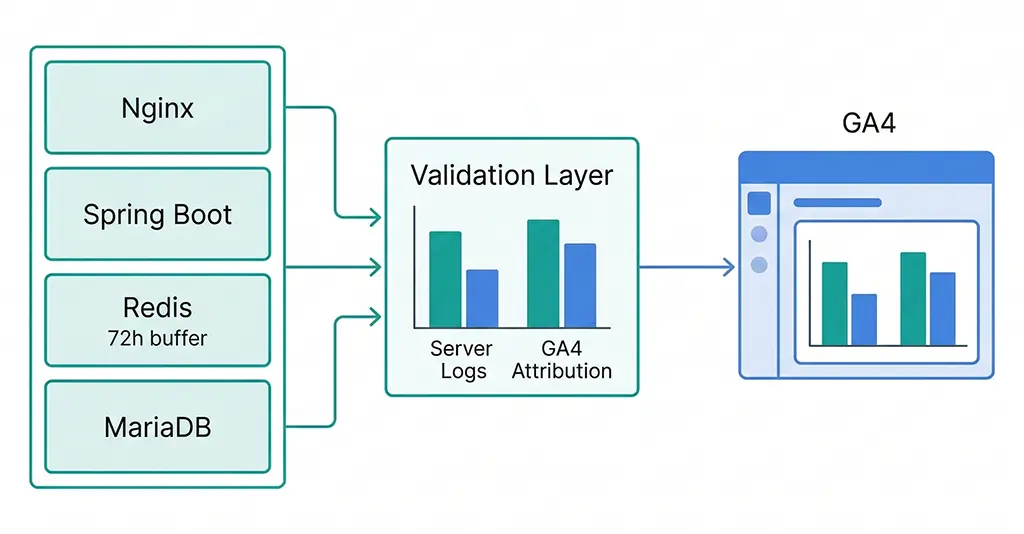
If you're running a link shortening or redirect service with server-side click logging — as I do at vvd.im — you have access to something GA4's DDA doesn't: a complete, unsampled record of every click on every tracked link, including the full UTM parameters at the moment of the click, before any redirect logic or browser behavior can lose them.
This server-side data lets you build a ground-truth attribution picture that you can compare against GA4's output. The comparison won't be perfect — your server sees clicks, not sessions, and it can't observe what happens after the initial redirect — but it gives you a sanity check on whether GA4's channel data is roughly accurate or significantly distorted by tagging failures.
Here's the query pattern I use against the vvd.im MariaDB click log to pull a channel-level attribution summary that I can compare against GA4's last-click report:
-- Pull the "last tagged click" before each conversion window
-- Assumes clicks table has: click_id, short_code, utm_source, utm_medium,
-- utm_campaign, clicked_at, session_id (hashed IP+UA), converted (boolean)

SELECT
    utm_medium,
    utm_source,
    COUNT(*) AS total_clicks,
    SUM(CASE WHEN converted = 1 THEN 1 ELSE 0 END) AS attributed_conversions,
    ROUND(
        SUM(CASE WHEN converted = 1 THEN 1 ELSE 0 END) * 100.0 / COUNT(*),
        2
    ) AS conversion_rate_pct
FROM (
    -- For each session, take only the last click before conversion
    SELECT
        session_id,
        utm_medium,
        utm_source,
        converted,
        ROW_NUMBER() OVER (
            PARTITION BY session_id
            ORDER BY clicked_at DESC
        ) AS rn
    FROM clicks
    WHERE clicked_at >= DATE_SUB(NOW(), INTERVAL 30 DAY)
      AND utm_medium IS NOT NULL
      AND utm_medium != ''
) ranked
WHERE rn = 1  -- last click per session only
GROUP BY utm_medium, utm_source
ORDER BY attributed_conversions DESC;
The output of this query gives you a server-side last-click attribution table. If the channel distribution roughly matches GA4's last-click report, your tagging infrastructure is healthy and you can trust GA4's DDA output with more confidence. If significant channels appear in your server logs but show up as "direct" or "(not set)" in GA4, you have a UTM loss problem that is corrupting both models — and fixing the data quality issue should come before changing the attribution model.
Cross-Referencing Redis Click Logs for Real-Time Validation
For high-traffic periods — campaign launches, promotions — I use Redis as a short-term click buffer before data is flushed to MariaDB. This lets me run quick validation queries during a campaign without touching the main database. The structure is a sorted set per short code, keyed by timestamp, with click metadata stored as a JSON hash:
// Spring Boot service: log click to Redis on each redirect
// Retention: 72 hours (TTL), then flushed to MariaDB by batch job

@Service
public class ClickLoggingService {

    private final RedisTemplate<String, String> redisTemplate;

    public void logClick(ClickEvent event) {
        String key = "clicks:" + event.getShortCode() + ":" + event.getDate();
        String field = event.getClickId();

        Map<String, String> payload = Map.of(
            "utm_source",   nvl(event.getUtmSource()),
            "utm_medium",   nvl(event.getUtmMedium()),
            "utm_campaign", nvl(event.getUtmCampaign()),
            "clicked_at",   event.getClickedAt().toString(),
            "session_hash", event.getSessionHash()
        );

        // Store as hash; expire after 72h
        String hashKey = "clickmeta:" + field;
        redisTemplate.opsForHash().putAll(hashKey, payload);
        redisTemplate.expire(hashKey, Duration.ofHours(72));

        // Add to sorted set for time-ordered retrieval
        redisTemplate.opsForZSet().add(
            key,
            field,
            event.getClickedAt().toEpochMilli()
        );
        redisTemplate.expire(key, Duration.ofHours(72));
    }

    private String nvl(String val) {
        return val != null ? val : "(none)";
    }
}
With this in place, during a campaign I can query Redis to get a real-time channel breakdown of incoming clicks and compare it against what GA4 is reporting in near-real-time via the Realtime report. Any consistent divergence — say, Redis shows 60% of clicks tagged with utm_medium=email but GA4's Realtime shows that source as 30% — indicates UTM parameters are being lost post-click, and the attribution data for that campaign will be garbage regardless of which model you use.
Making the Actual Decision: When to Switch, When to Stay
After going through this analysis, the decision framework I use is straightforward:
Stay with last-click if: Your conversion volume is below the 400/month threshold and DDA is silently falling back anyway. Your average path length is one to two touchpoints. Your channel mix is simple — mostly paid search and direct. You don't have enough path diversity for DDA to find a signal.
Switch to DDA if: You have consistent conversion volume above 400/month per event. Your Paths report shows meaningful multi-touch journeys. You have at least one channel that consistently appears mid-funnel but rarely closes — especially if you're making budget decisions about that channel. Your data quality checks show UTM parameters are surviving intact through your redirect chain.
Fix the data first if: Your server-side click logs and GA4 channel distributions diverge significantly. You have high "direct" or "(not set)" attribution that you can't explain. Your UTM parameters are getting stripped in redirects. No attribution model produces meaningful output from corrupted input data — and DDA is particularly vulnerable to this because it will confidently distribute fractional credit across a distorted channel set, giving you precise but wrong numbers.
The practical ceiling on DDA's value is the quality of GA4's observed path data. If your tracking infrastructure is solid, the model switch is worth making and worth revisiting quarterly as your conversion volume changes. If it isn't, the attribution model conversation is premature.