I've watched direct traffic numbers in GA4 get explained away more times than I can count. "That's brand awareness working." "Those are users who already know us." Sometimes that's true. But when direct jumps 40% the week after you launch a new email campaign, or spikes every Monday morning when the weekly newsletter goes out, you're not looking at brand loyalty — you're looking at attribution failure. The traffic came from somewhere. GA4 just couldn't figure out where, so it called it direct.
The frustrating part is that direct inflation isn't a single problem with a single fix. It's an accumulation of several distinct failure modes, each operating at a different point in the click-to-session pipeline. Getting a handle on which ones are affecting your data requires understanding the mechanism behind each one, not just the symptom.
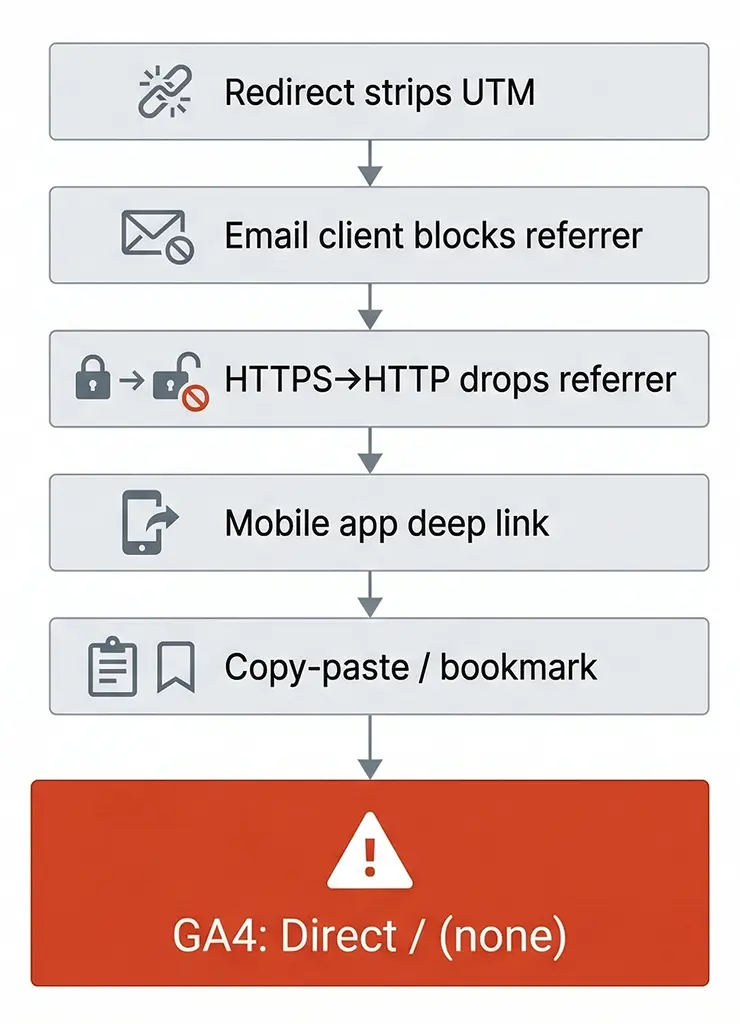
The Five Mechanisms That Feed Direct
Each of these operates independently, but they often compound. A link that goes through a redirect chain, originating from an email, sent over a mobile device, clicking through to an HTTP page — that's four separate failure modes stacked on one click.
1. UTM Parameters Stripped in a Redirect Chain
This is the most common source of direct inflation for anyone running campaigns through short links or third-party redirect infrastructure. The full sequence: you tag a link with UTM parameters, someone clicks it, the first redirect server receives the request, but when it issues the next redirect, it reconstructs the destination URL without the query string. The browser follows the redirect to the final page with no UTMs. GA4 collects the session with no campaign data, has no referrer it can interpret as a known channel, and falls back to direct.
The Nginx configuration failure I see most frequently is the rewrite directive without $is_args$args:
# WRONG — strips query string including UTM parameters
rewrite ^/([a-zA-Z0-9]+)$ https://destination.com/$1 permanent;

# CORRECT — preserves full query string across the redirect
rewrite ^/([a-zA-Z0-9]+)$ https://destination.com/$1$is_args$args permanent;
The $is_args variable resolves to ? when a query string is present and to an empty string when it isn't. Without it, you either get a bare URL or a literal ? appended to URLs that had no parameters. Both are wrong in different ways. The symptom in GA4 is a surge in direct traffic that correlates exactly with campaign traffic volume — and server logs showing all the right UTM-tagged requests hitting the redirect endpoint, followed by a clean destination URL with nothing on it.
2. Email Client Referrer Suppression
Email clients don't pass referrer headers to the browser the way web pages do. When a user clicks a link in Gmail, Apple Mail, Outlook, or any major mobile mail app, the resulting browser session has no referrer that GA4 can inspect. If the link is also untagged or the UTM gets stripped, the session is pure direct. Even when the link is correctly tagged, GA4 depends entirely on those UTM parameters surviving intact — there's no referrer fallback for email.
This is why email attribution is binary in a way that other channels aren't: either the UTM parameters arrive at the final page or the session is direct. There's no partial credit, no inference from domain patterns. Email clients vary in how they handle links. Some rewrite them through their own tracking proxy (which may or may not preserve query strings). Some open them in an in-app browser that has different referrer behavior than the system browser. The safest assumption is that every email link needs UTM tagging, and every UTM tag needs to survive your entire redirect chain.
3. HTTPS to HTTP Protocol Downgrade
The HTTP specification strips the Referer header when a request crosses from a secure (HTTPS) origin to a non-secure (HTTP) destination. This is by design — browsers don't want to leak the URL of a secure page to a non-secure server. But the side effect is that any click originating from an HTTPS page (which is most of the web) landing on an HTTP destination loses its referrer entirely. GA4 sees the session with no referrer and calls it direct.
This is increasingly rare for main landing pages, which are almost universally HTTPS now. Where it still appears: legacy landing pages on subdomains that haven't been migrated, third-party checkout flows with mixed content, or internal tools that are HTTP only. If you're seeing direct spikes specifically on certain destination paths and those paths are still HTTP, that's the mechanism.
4. Mobile In-App Browser and Deep Link Behavior
When a user taps a link inside Instagram, Facebook, LinkedIn, TikTok, or any app that renders links in its own embedded WebView rather than handing off to Safari or Chrome, referrer behavior becomes unpredictable. Some in-app browsers pass a referrer, some don't. Some pass the app's own domain as a referrer (which GA4 may not recognize as a known channel), some pass nothing. The result is that a significant fraction of social media clicks — the ones from users who didn't tap "Open in browser" — land as direct.
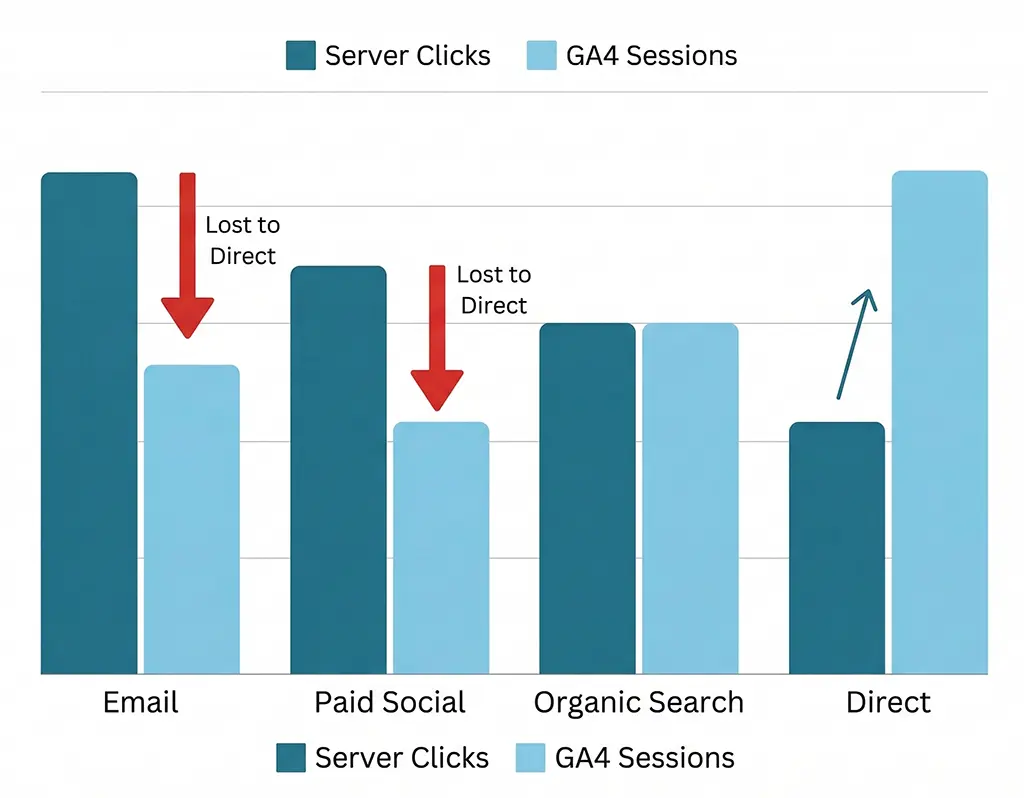
The giveaway in your data: if your paid social campaign shows strong click volume in the ad platform but weak session volume in GA4 with a corresponding direct spike during the campaign period, in-app browser referrer loss is a likely contributor alongside UTM issues.
5. Bookmark, Copy-Paste, and Typed Navigation
This is the only one that's actually legitimate direct traffic. Users who bookmark a page and return to it, who type a URL directly, or who paste a URL from a document or message thread generate sessions with no referrer and no UTM. GA4 correctly calls these direct. The challenge is that legitimate direct is mixed in with all the failure modes above, and GA4 doesn't distinguish between them. Your direct channel number is a blend of brand loyalty and broken tracking infrastructure, with no easy way to decompose it from within GA4 alone.
Quantifying How Much of Your Direct Is Contaminated
The cleanest way to estimate contamination is to compare your server-side click logs against GA4's channel breakdown. If you're running a redirect service or link shortener with server-side logging, you have the ground truth: every click that hit your redirect endpoint, with full UTM parameters at the moment of the request, before any downstream stripping could occur.
The comparison query I run against the vvd.im MariaDB click log cross-references server-logged UTM medium against GA4's reported channel for the same traffic period:
-- Estimate direct contamination by comparing server-logged UTM volume
-- against expected GA4 channel volume for the same date range.
-- If server shows N email clicks but GA4 shows far fewer email sessions,
-- the delta is absorbed into direct.

SELECT
    DATE(clicked_at)                         AS click_date,
    COALESCE(utm_medium, '(none)')           AS utm_medium,
    COALESCE(utm_source, '(none)')           AS utm_source,
    COUNT(*)                                 AS server_click_count,
    -- Flag clicks where UTM params exist on server but may be lost downstream
    SUM(CASE
        WHEN utm_medium IS NOT NULL AND utm_medium != ''
        THEN 1 ELSE 0
    END)                                     AS tagged_clicks,
    SUM(CASE
        WHEN (utm_medium IS NULL OR utm_medium = '')
          AND (utm_source IS NULL OR utm_source = '')
        THEN 1 ELSE 0
    END)                                     AS untagged_clicks
FROM clicks
WHERE clicked_at >= DATE_SUB(CURDATE(), INTERVAL 30 DAY)
GROUP BY click_date, utm_medium, utm_source
ORDER BY click_date DESC, tagged_clicks DESC;
Export this alongside GA4's channel-by-day breakdown (via the Traffic Acquisition report, exported to CSV). For each medium, the server click count should be in the same ballpark as GA4's session count for that channel. The gap between them — the tagged clicks that GA4 isn't attributing to the correct channel — is your contamination estimate. It ends up in direct.
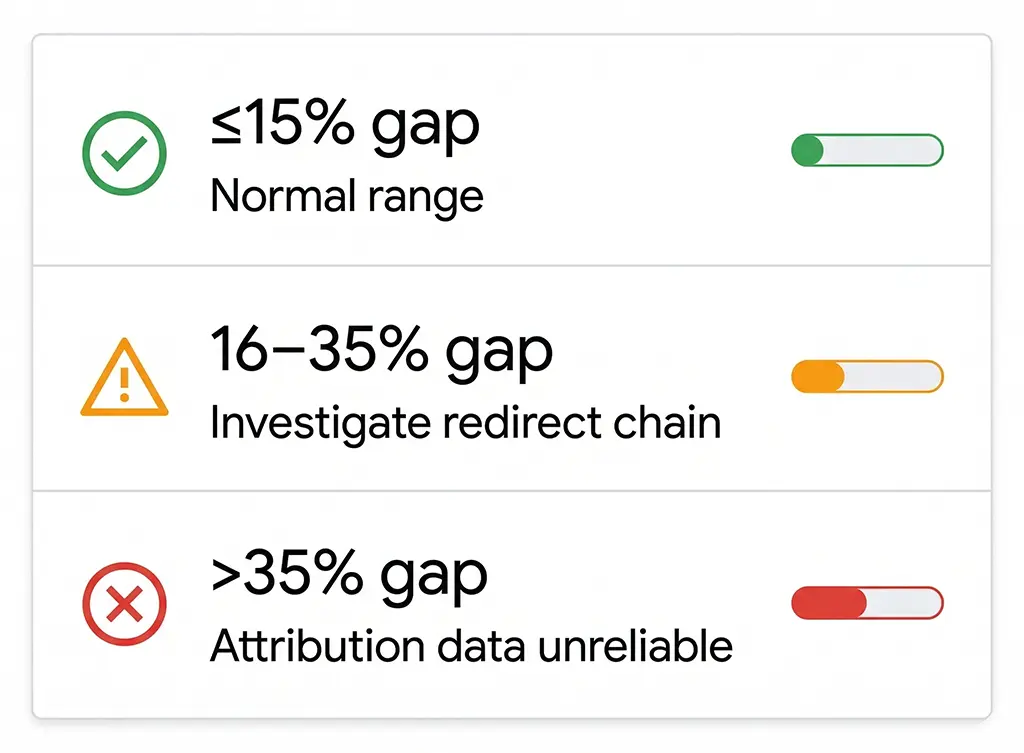
A realistic contamination benchmark from operating vvd.im: in campaigns where all redirects are correctly configured with $is_args$args and all email links are UTM-tagged, the server-vs-GA4 gap for email and social channels sits around 8–12%. That residual is mostly in-app browser and legitimate copy-paste behavior. When there's a redirect configuration problem, that gap jumps to 35–60% depending on the traffic source, and direct absorbs essentially all of it.
How Direct Inflation Distorts Every Other Channel's Metrics
The direct contamination problem isn't just that direct looks artificially large — it's that the distortion cascades through how you read every other channel. Here's the specific way each common metric gets skewed.
Conversion Rate by Channel
Sessions that belong to email or paid social but land in direct carry whatever conversion behavior those users have. If email subscribers convert at a high rate (which they typically do, being further down the funnel), and those sessions are landing in direct, your direct channel will show an inflated conversion rate. Meanwhile, email's reported conversion rate will be based on a smaller, potentially less representative sample. You may be looking at a report that tells you direct converts at 4% and email converts at 2% — and drawing conclusions about channel value from numbers that are almost inverted from reality.
Assisted Conversion Paths
In GA4's Paths and Attribution reports, the contaminated sessions don't appear under their real channel. The assist credit that should flow to email or social flows to direct instead. If you're trying to understand how your channels work together, a polluted direct channel creates noise in every path that includes it. Data-driven attribution will attempt to assign credit to direct as if it were a real assist channel, which compounds the distortion.
New vs. Returning User Segmentation
Direct traffic has a higher proportion of returning users in most accounts, because genuine direct visits (bookmarks, typed URLs) are predominantly returning behavior. When you pile contaminated sessions from email and social into direct, the new/returning ratio for that channel shifts, and so does the new/returning ratio for the channels losing those sessions. Email, which should show a mix of new subscribers and returning converters, will appear to skew toward whatever's left after the returning-heavy converters land in direct.
Landing Page Performance Reports
If you're running reports on landing page performance by channel, the contaminated sessions are landing on your campaign pages under the direct label. If you have a campaign-specific landing page that should only be reached via campaign links, and that page shows a meaningful direct share, that's a direct indicator of UTM loss. Legitimate direct traffic doesn't type in https://yoursite.com/lp/spring-campaign-2026. Any direct session on a campaign-specific URL is almost certainly misattributed.
Fixing the Infrastructure vs. Adjusting the Analysis
There are two response strategies, and they're not mutually exclusive. Fixing the infrastructure reduces future contamination. Adjusting the analysis lets you work with cleaner numbers from historical data.
Infrastructure Fixes
The Nginx fix for query string preservation ($is_args$args) is the highest-leverage single change for redirect-based UTM loss. In Spring Boot, if you're programmatically constructing redirect URLs, use UriComponentsBuilder rather than string concatenation — it handles encoding and parameter forwarding correctly and won't silently drop parameters on edge cases:
// Spring Boot 3.x: forward UTM params from incoming request to redirect target
// Safely preserves all query parameters including UTM tags

@GetMapping("/{shortCode}")
public ResponseEntity<Void> redirect(
        @PathVariable String shortCode,
        HttpServletRequest request) {

    String destination = lookupDestination(shortCode);
    String queryString = request.getQueryString();

    URI redirectUri;
    if (queryString != null && !queryString.isBlank()) {
        // Append original query string to destination
        // Handles existing params on destination with & separator
        redirectUri = UriComponentsBuilder
            .fromUriString(destination)
            .query(queryString)  // forwards full query string verbatim
            .build(true)         // true = already encoded, don't double-encode
            .toUri();
    } else {
        redirectUri = URI.create(destination);
    }

    // Use 302 to prevent browser caching the redirect,
    // ensuring server-side click log fires on every visit
    return ResponseEntity
        .status(HttpStatus.FOUND)
        .location(redirectUri)
        .build();
}
The 302 vs 301 choice here is deliberate. A 301 response gets cached by the browser, which means return visits skip the redirect server entirely — and your server-side click log never sees them. This is covered in more depth in the redirect chain debugging article, but the point relevant here is that 301-cached redirects are a direct contamination source: the user revisits via their browser cache, GA4 sees no UTM, and logs the session as direct.
Adjusting the Analysis
For historical data where the infrastructure was broken, you can use campaign-specific landing page URLs as a filter proxy. Create a segment in GA4 for sessions that landed on your campaign pages but were attributed as direct. The proportion of those sessions gives you a rough floor on contamination during that period. You can't retroactively fix the attribution, but you can annotate the period and apply a mental correction factor when presenting channel performance data.
For ongoing campaigns, the Redis-buffered click log pattern provides a parallel source of truth. By tracking click volume per UTM medium in Redis in real-time and comparing it against GA4's live session counts (via the Realtime API or manual Realtime report checks), you can detect UTM loss within hours of a campaign launch rather than discovering it during the post-campaign analysis.
// Spring Boot: compare Redis click counts against a GA4 Data API snapshot
// Used for real-time contamination detection during active campaigns

@Service
public class AttributionAuditService {

    private final RedisTemplate<String, String> redisTemplate;

    /**
     * Returns click count per utm_medium from Redis buffer
     * for the current day. Compare against GA4 channel sessions
     * for the same window to estimate contamination rate.
     */
    public Map<String, Long> getClicksByMediumToday() {
        String today = LocalDate.now().toString(); // "2026-03-06"
        Set<String> keys = redisTemplate.keys("clicks:*:" + today);

        Map<String, Long> mediumCounts = new HashMap<>();

        if (keys == null || keys.isEmpty()) return mediumCounts;

        for (String key : keys) {
            Set<String> clickIds = redisTemplate.opsForZSet()
                .range(key, 0, -1);

            if (clickIds == null) continue;

            for (String clickId : clickIds) {
                String medium = (String) redisTemplate.opsForHash()
                    .get("clickmeta:" + clickId, "utm_medium");

                if (medium != null && !medium.equals("(none)")) {
                    mediumCounts.merge(medium, 1L, Long::sum);
                }
            }
        }
        return mediumCounts;
    }
}
A 10–15% gap between server-logged tagged clicks and GA4 sessions per medium is within normal range. Above 20%, investigate the redirect chain for that campaign. Above 35%, the campaign's attribution data is effectively unusable without manual correction, and the infrastructure issue should be treated as a blocking problem before you spend more on that campaign.
The One Thing Direct Traffic Should Tell You
Genuinely high direct traffic is meaningful signal — but only in specific contexts. If you run a well-known brand with strong retention, high direct is expected and healthy. If direct spikes on days when you send email or run social campaigns, you have a tracking problem. If direct is high specifically on campaign landing pages, you definitely have a tracking problem. If direct is high primarily on the homepage and account login pages, that's legitimate returning user behavior and there's nothing to fix.
The practical habit worth building: check your direct share per landing page path weekly during active campaigns, cross-referenced against your server-side click logs for the same period. Any campaign-specific URL showing more than 15% direct attribution should be treated as a canary for infrastructure failure, not a sign that users are organically typing that URL into their browsers. They aren't.